
The Bit Bucket

Opinion: NEWSEQUENTIALID is a pointless function

Opinion: NEWSEQUENTIALID is a pointless function

SQL Server 2005 introduced the NEWSEQUENTIALID() function, with some fanfare. I could never see it being interesting in any way, and I still don’t.

The argument was that there were so many performance problems being caused by developers using GUIDs as primary keys in tables, and those primary keys also ended up being the clustering keys for the tables (doesn’t have to be that way but that’s the default behavior). The random order was then causing big fragmentation issues when INSERT operations were performed.

2018-05-01
Upcoming SQL Saturdays - Brisbane, Melbourne, Auckland

We’re coming into the season for another round of SQL Saturday events.

I can’t be at all of the local ones unfortunately. (Sad to miss Sydney but won’t be around then). I’ll be presenting sessions in Brisbane, and Auckland, hopefully also in Melbourne, then delivering a number of user group sessions around Switzerland.

In Brisbane, I’ll be speaking on SQL Server Management Studio tips and tricks: https://www.sqlsaturday.com/713/eventhome.aspx

That will cover off a number of the items from our new eBook: https://sqldownunder.com/freestuff/ .

2018-05-01

SSMS: Fix Intellisense and Printer Colors in SQL Server Management Studio

SSMS: Fix Intellisense and Printer Colors in SQL Server Management Studio

SQL Server Management Studio (SSMS) is a highly configurable tool. One of the areas that’s often ignored but which can be quite important is color configuration.

SSMS color codes SQL scripts (and other types of files that it understands) as you type.

This is really useful but I’ve found on some systems that some of the color selections aren’t great. Here’s an example:

On many systems that I work with, the color for sys.tables in the query above is quite a fluoro green and almost unreadable. But if you don’t like this, you can change it.

2018-04-26

Free eBook: SQL Server Management Studio Tips and Tricks

Free eBook: SQL Server Management Studio Tips and Tricks

I’m so pleased to now have this book out. You’ll find it here:

https://sqldownunder.com/freestuff

I’ve worked with SQL Server for decades and have compiled this list of tips and tricks over that time. This eBook is a compilation of a series of blog posts that I have either made or are scheduled to be made as part of my Thursday “Shortcut” series, for shortcuts that apply to SSMS.

There are a lot of tips and tricks. It’s now not far from 200 pages.

2018-04-24

SSMS: Presentation Mode in SQL Server Management Studio

SSMS: Presentation Mode in SQL Server Management Studio

I spend a lot of time delivering presentations of various types. Many of those presentations involve showing code in either SQL Server Management Studio (SSMS) or Visual Studio (VS).

I’ve become quite fast at taking a default setup of SSMS and changing it to the fonts, etc. that I want to use for a presentation. Given how large these fonts are, I don’t want to use them for day to day work.

2018-04-19

SDU Tools: Table of Numbers in SQL Server T-SQL

SDU Tools: Table of Numbers in SQL Server T-SQL

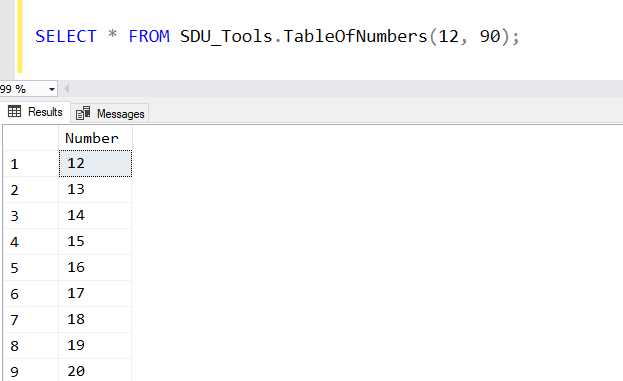
For anyone who’s worked with SQL Server for a long time, you’ll know that one of the common requests is that a table of numbers would be useful. Yes, just a table with 1, 2, 3, 4 and so on. Often in a query, you need just a certain set of values.

In our free SDU Tools, we’ve added a function to do that in a reasonably efficient way.

2018-04-18

Fix: Reporting Services Configuration Manager can't find Power BI Report Server

Fix: Reporting Services Configuration Manager can't find Power BI Report Server

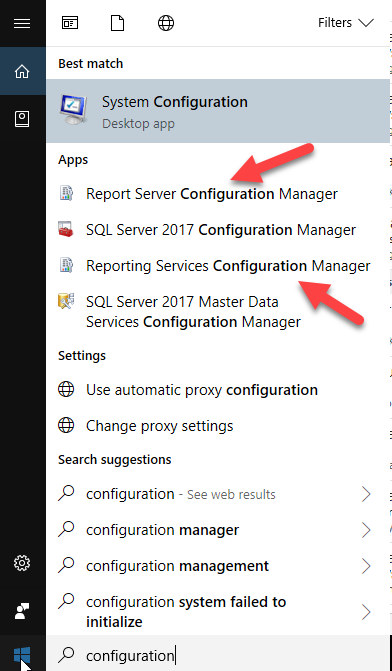
I just spent ages trying to work out why I couldn’t connect to Power BI Report Server using the Reporting Services Configuration Manager.

Amazingly, I hadn’t had to reconfigure it since I installed it, but now I needed to change the email account.

And it just wouldn’t see that it existed. If I put MACHINENAME only, it told me it couldn’t find the server, and if I put MACHINENAME\PBIRS, it said it was an invalid namespace.

2018-04-17

SDU Tools: SQL Server System Configurations and What's Changed

SDU Tools: SQL Server System Configurations and What's Changed

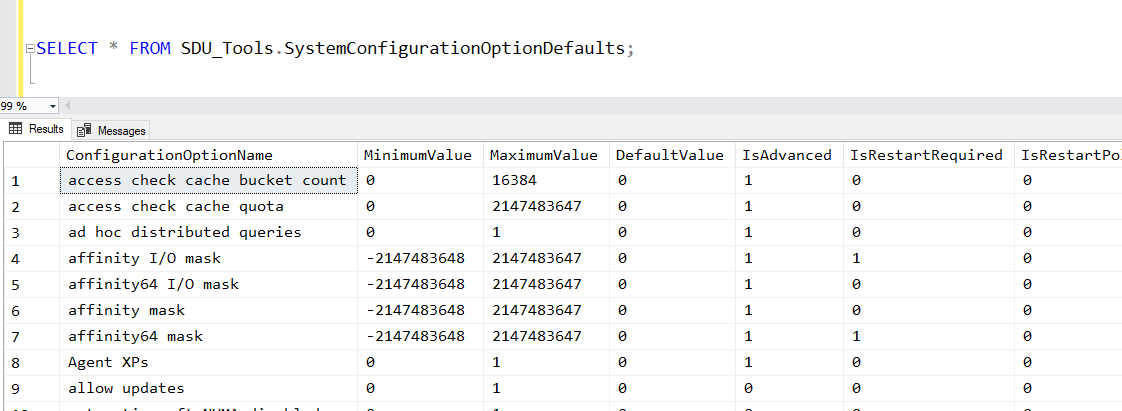
When I first start working with any SQL Server system, one of the first things I want to look at is how the server has been configured.

More particularly, what I’m interested in is:

What has been changed from the default value?

None of the standard SQL Server system views, however, provides me with this info. We do have the sys.configurations view. It shows you the configurations and what’s been chosen, but it doesn’t show you what the default value was:

2018-04-11

AI: New Microsoft Professional Program in Artificial Intelligence

AI: New Microsoft Professional Program in Artificial Intelligence

In the last year or so, there has been a quiet revolution going on with how Microsoft delivers training and certification.

Previously, the main option was Microsoft Official Curriculum (MOC) courses delivered by Certified Learning Partners. For some years, I’ve been saying that I don’t see that as the longer-term model for Microsoft. I believe that’s for three reasons:

  • The learning experiences team in Microsoft have needed to be a profit center.
  • The product groups want as much information out there as possible and as free as possible.
  • The creation and delivery processes for MOC courses don’t lend themselves well to constantly-evolving information.

That has to lead to real challenges within the company.

2018-04-06

SSMS: Navigate as you type in sorted SSMS Object Explorer Details pane

SSMS: Navigate as you type in sorted SSMS Object Explorer Details pane

I’ve mentioned a number of times how useful I think the Object Explorer Details panel is in SQL Server Management Studio.

Another option in that panel that might not be so obvious is the sorted navigation. Here’s an example.

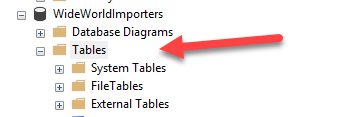
I’ve opened WideWorldImporters in Object Explorer, and clicked on the Tables node:

I then hit F7 to open the Object Explorer Details pane, and click the Name heading to sort the table list:

2018-04-05