Fabric

SSMS: Running SQL Server Management Studio as someone else

SSMS: Running SQL Server Management Studio as someone else

You don’t always want to run SQL Server Management Studio (SSMS) as your current login for Windows.

Now if all you want to do is to use a SQL Server login, then that’s easy. When you connect to a server in Object Explorer, or when you start a new Database Engine query, you can just choose SQL authentication instead.

But three other scenarios commonly occur:

As administrator

If you need to run SSMS as an administrator on a machine with UAC, you can do this:

2026-11-26
SSMS: Map mode in the SSMS scroll bar

SSMS: Map mode in the SSMS scroll bar

In previous posts (here and here), I’ve described ways to configure the scroll bar in SQL Server Management Studio (SSMS).

There is another key option that I haven’t discussed previously: map mode.

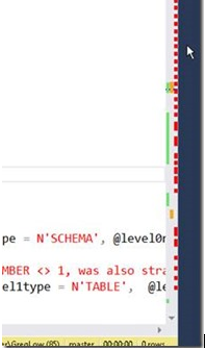
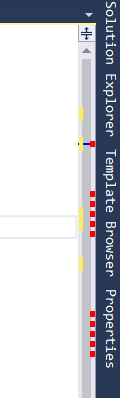
By default, the scroll bar shows the changes, syntax errors, etc:

If you have a long script though, it can be hard to visualize what’s in the other parts of the script. Map mode can help with this.

2026-11-24

SSMS: Dependency tracking in SQL Server Management Studio

SSMS: Dependency tracking in SQL Server Management Studio

In early versions of SQL Server, the only way to try to track dependencies between tables, procedures, functions, etc. was to use the sp_depends stored procedure. And everyone thought it lied. The real problem was that it didn’t understand partial dependencies and deferred resolution of objects. For example, it got confused if you created a procedure that mentioned a table, then later created the table.

Back in 2012, SQL Server introduced far superior dependency views, and SQL Server Management Studio (SSMS) can use those views to show you object dependencies.

2026-11-18

SSMS: Making sense of the colors in the SSMS scroll bar

SSMS: Making sense of the colors in the SSMS scroll bar

In an earlier post, I described how I didn’t particularly like all the colors that are shown in the scroll bar now in SQL Server Management Studio (SSMS):

In that post, I described how to turn them all off, or at least how to kill off some of them. But, of course they are there for a reason. Instead of turning them all off, you might decide to make sense of what they are there for.

2026-11-16

SQL - Fabric: FABCON and SQLCON are coming to Sydney in April 2027 - Discounts now

SQL - Fabric: FABCON and SQLCON are coming to Sydney in April 2027 - Discounts now

It’s awesome that FABCON is coming to Sydney early next year. It’s now one of the best conferences each year globally and has loads of Fabric and SQL goodness. Our friends at Microsoft have provided this info to let you get an early bird discount.

Register today and Save AUD$300 with code: FABSQL-UG

The APAC Microsoft Fabric + SQL Community Conference (6–9 April 2027, ICC Sydney) brings together data, analytics, BI, and AI professionals from across Asia-Pacific. Hear from Microsoft and community experts with practical guidance, real-world patterns, and lessons learned.

2026-11-07

Fabric RTI 101: Edge Scenarios

Fabric RTI 101: Edge Scenarios

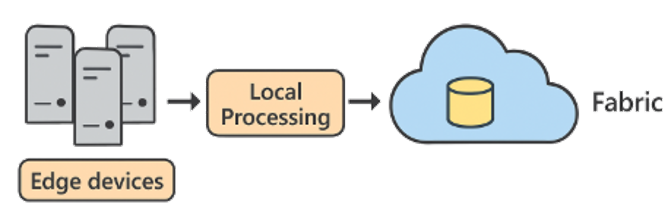
Edge computing plays a key role in modern real-time data architectures by moving some processing closer to where data is generated. Instead of sending every raw data point to the cloud, devices or gateways at the edge can handle local filtering, aggregation, and enrichment.

Edge Scenarios

Using Azure IoT Edge or similar frameworks, organizations can deploy lightweight processing modules directly on devices, gateways, or factory controllers. These modules can execute logic such as:

2026-10-28

Fabric RTI 101: Digital Twins

Fabric RTI 101: Digital Twins

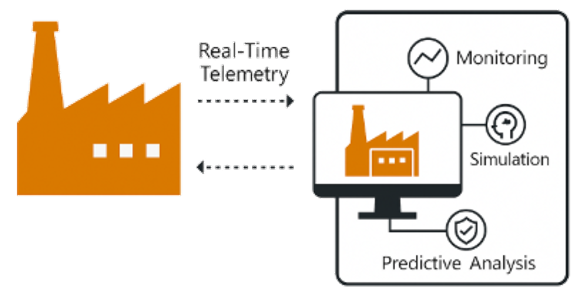
A digital twin is a virtual representation of a physical system or asset - such as an engine, a building, a production line, or a logistics network.

Unlike a static model, a digital twin is continuously synchronized with its real-world counterpart through real-time telemetry and sensor data. This constant data flow ensures that the virtual model reflects the current operating state of the physical system.

Digital Twins

The purpose of a digital twin extends beyond visualization. It enables simulation, monitoring, and predictive analysis. For example, engineers can test what-if scenarios - such as how a machine might behave under higher load or different environmental conditions - without interrupting operations. It also supports predictive maintenance, by identifying early indicators of wear or failure before they result in downtime.

2026-10-26

Fabric RTI 101: Emerging Patterns for Real-Time

Fabric RTI 101: Emerging Patterns for Real-Time

Several important trends are shaping the future of real-time data systems, moving beyond simple event streaming toward intelligent, autonomous, and action-oriented pipelines.

One key direction is the integration of streaming with AI and machine learning. Instead of passively analyzing data, systems can now make inferences or decisions as events occur - for example, predicting failures, recommending actions, or adapting system behavior in real time. This shift from descriptive to predictive and prescriptive analytics marks an important evolution.

2026-10-24

Fabric: What are those strange orange boxes in my SQL editor?

Fabric: What are those strange orange boxes in my SQL editor?

Today, I was editing some SQL code using the SQL editor in a Microsoft Fabric Warehouse.

I needed to reorder a list of columns.

I find that a pretty frustrating editor but usually I can avoid it by connecting with SSMS. But for some reason, SSMS decided it didn’t want to connect to the warehouse today either.

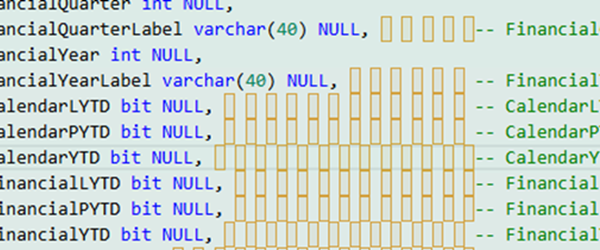
No problems, I thought I’ll just edit the code with a combination of SSMS, and Excel (to reorder the column names), and then paste the code back into the Fabric SQL editor. But every time I did that, I ended up with a bunch of strange orange boxes all throughout the code.

2026-10-23

Fabric RTI 101: Integrating RTI vs Azure Stream Analytics

Fabric RTI 101: Integrating RTI vs Azure Stream Analytics

Both Fabric Real-Time Intelligence (RTI) and Azure Stream Analytics (ASA) are designed to process streaming data, but they serve different roles within the Microsoft data ecosystem.

Integrating RTI vs Azure Stream Analytics

Fabric RTI is part of the broader Microsoft Fabric platform. It uses KQL (Kusto Query Language) as its foundation and is tightly integrated with OneLake, Power BI, and other Fabric components such as Eventstream and Activator. This integration makes it suitable for end-to-end real-time analytics, where streaming data is combined with historical data, transformed, visualized, and acted upon - all within one environment.

2026-10-22