
Fabric: What are those strange orange boxes in my SQL editor?
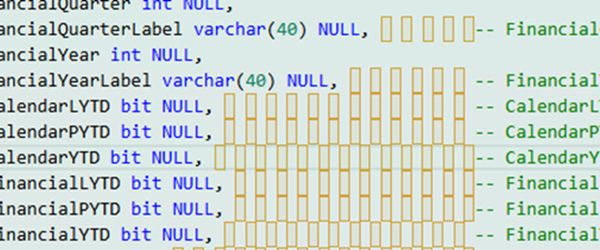
Today, I was editing some SQL code using the SQL editor in a Microsoft Fabric Warehouse.
I needed to reorder a list of columns.
I find that a pretty frustrating editor but usually I can avoid it by connecting with SSMS. But for some reason, SSMS decided it didn’t want to connect to the warehouse today either.
No problems, I thought I’ll just edit the code with a combination of SSMS, and Excel (to reorder the column names), and then paste the code back into the Fabric SQL editor. But every time I did that, I ended up with a bunch of strange orange boxes all throughout the code.
I presumed they were some sort of Unicode whitespace and also presumed I could remove them by:
- Copy the text into Notepad
- Save the text using ANSI instead of the UTF-8 default
- Close and reopen the text in Notepad
- Copy the text back to the SQL editor
I thought I’d have it fixed, but alas, they were still there. I realized later that they could be represented just fine in ANSI.
The Fabric editor uses Monaco (the editor technology behind VS Code), which can highlight unusual Unicode characters. SSMS generally doesn’t highlight them.
What they were was a Unicode whitespace character \u00A0. Fortunately, I was able to use Ctrl-H for find and replace, then turn on the Regex option (that’s the .* option) and paste in the \u00A0 for the find string, and a space for the replace string, then click the icon to replace all.
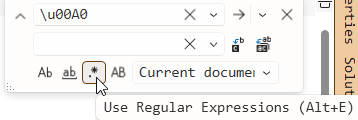
You can do that in the Fabric SQL editor and in SSMS.
And magically, they were all gone. So if you get stuck with a screen with a bunch of strange orange boxes in your editor, you know what to do.
2026-10-23