Ssms

SSMS: Viewing and configuring spatial data output in SSMS

SSMS: Viewing and configuring spatial data output in SSMS

SQL Server 2008 added the ability to work with spatial data by the additional of the geometry and geography data types. When they first were added, there was no tools support for working with them, and all we had was direct manipulation of their internal binary storage.

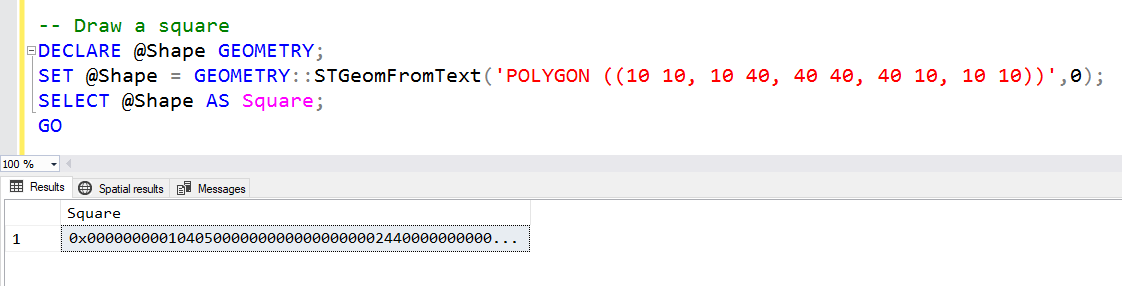
Here’s an example:

I’ve defined a variable named @Shape of type GEOMETRY. I’ve then assigned a shape to it, based on a polygon formed by a set of points. If you look carefully, you’ll notice that it’s a square.

2018-11-22

SSMS: Set SQLCMD mode for all new query windows in SSMS

SSMS: Set SQLCMD mode for all new query windows in SSMS

SQLCMD mode changes how queries are executed in SQL Server Management Studio (SSMS). When using this mode, you can work with options that aren’t normally part of SQL Server T-SQL scripts.

Some installation scripts also require SQLCMD mode and will fail if it’s not enabled.

Here’s an example of running a query against 3 servers within the same script:

First we open a new query window, then on the Query menu, we choose SQLCMD Mode.

2018-11-15

SSMS: Set query shortcuts for favorite stored procedures in SSMS

SSMS: Set query shortcuts for favorite stored procedures in SSMS

In an earlier post, I mentioned how useful the F1 key is. On its own, it provides syntax help, but when you highlight an object and hit Alt-F1, you get to see metadata about the object.

Under the covers, this just runs the sp_help stored procedure. Alt-F1 has been mapped to that.

You can see where this is configured, change it if required, and/or configure other procedures as well.

In Tools, Options, Environment, Keyboard, then Query Shortcuts, you can see this:

2018-11-08

SSMS: Multi-server queries in SQL Server Management Studio

SSMS: Multi-server queries in SQL Server Management Studio

In an earlier post, I mentioned that you can create a registered list of servers, either in Local Server Groups or stored in a Central Management Server.

What I didn’t really talk about though, is what you can do with these groups of servers, rather than just executing queries on an individual server.

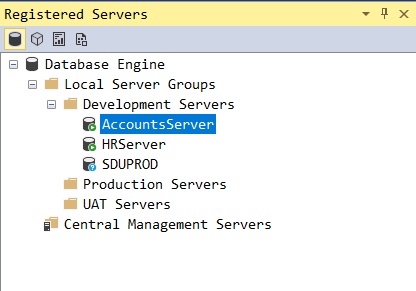
I’ve created three local server groups, for my development, UAT, and production servers.

The Development Servers group has three database servers in it. If I right-click the group, rather than any individual server, we get these options:

2018-11-01

SSMS: Configuring registered servers in SQL Server Management Studio

SSMS: Configuring registered servers in SQL Server Management Studio

When working with SQL Server systems, it can be hard to remember the names of all the servers, to remember connection details for the ones that need SQL logins (instead of Windows authentication), and to remember other details of those servers, such as which environments they are part of (eg: production, UAT, test)

SQL Server Management Studio (SSMS) has a facility to help you to do this. It allows you to register server details in a single place.

2018-10-25

SSMS: Finding error locations within queries in SQL Server Management Studio

SSMS: Finding error locations within queries in SQL Server Management Studio

This is probably one of the simplest tips that I’ve published, yet I’m endlessly surprised how many people do not realize that it’s available.

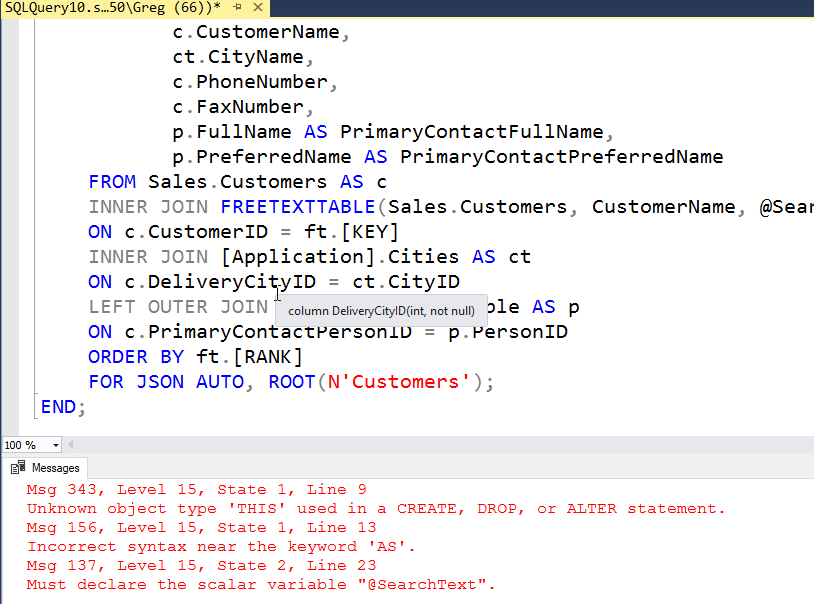
When you have a script loaded in SQL Server Management Studio (SSMS), and you execute the script, you might run into an error like this:

To find where the error is, just double-click the error down in the Messages tab. I double-clicked it, and it took me directly to the error and highlighted it:

2018-10-18

SSMS: Change the number of rows selected or edited in Object Explorer in SSMS

SSMS: Change the number of rows selected or edited in Object Explorer in SSMS

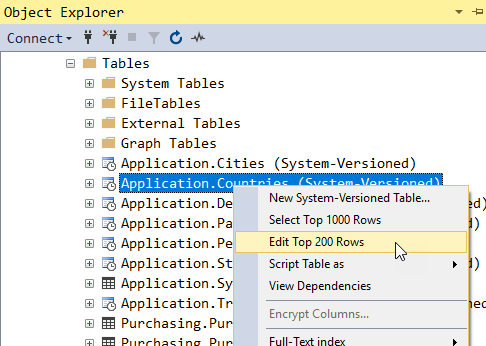
When you right-click a table in SQL Server Management Studio, you get options for selecting or editing but the number of rows is limited:

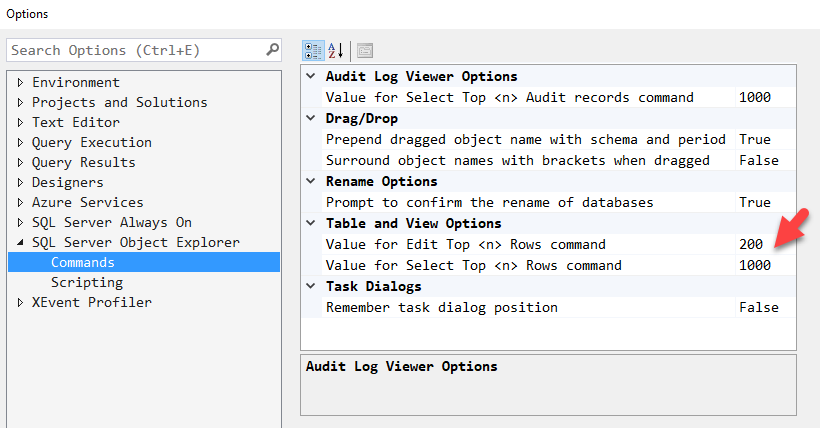
Those values can be changed. By default, these numbers are both 200, but I’ve decided to change the default number of rows selected to 1000.

In Tools, Options, SQL Server Object Explorer, then Commands, you can set the values to whatever suits you:

I don’t tend to ever use the Edit option but I’d suggest not making it too large.

2018-10-11

SSMS: XML editor in SSMS and increasing XML output size

SSMS: XML editor in SSMS and increasing XML output size

Most people use SQL Server Management Studio (SSMS) to edit SQL queries. No big surprise there. The files will have a file type of .sql.

But what many people don’t understand is that SSMS inherits many of its underlying Visual Studio’s abilities to edit other document types.

For example, if you open a .txt text file, you can edit it just fine, and you can also include files like this in SSMS script projects. That can be useful for additional notes and documentation.

2018-10-04

SSMS: Connecting to Azure Storage and other services in SSMS

SSMS: Connecting to Azure Storage and other services in SSMS

SQL Server Management Studio (SSMS) is a great tool for working with SQL Server relational databases but it can do much more than that.

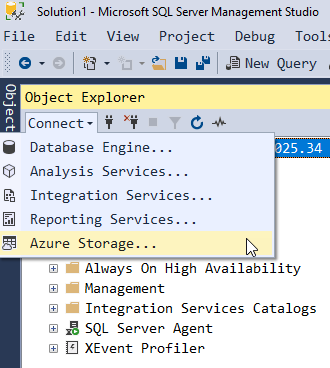
In Object Explorer, note that you can easily connect to other types of services:

For a long time, it has been able to connect to Analysis Services to manage SSAS databases, both tabular and multi-dimensional. It can connect to Integration Services but that’s to the older style interface for SSIS. Nowadays, you should use the SSIS Catalog instead. There are a few items that you can configure via the Reporting Services connection as well.

2018-09-27

SSMS: Disable certificate revocation checking to start SSMS faster

SSMS: Disable certificate revocation checking to start SSMS faster

If you have ever started SQL Server Management Studio in an isolated environment (ie: one with no external Internet connectivity), you’ll find that it’s slower to start.

That’s because SQL Server uses signed assemblies, and whenever an application with signed assemblies starts, it needs to check whether or not the certificate that they were signed with has been revoked. It’s not good enough to just check if it’s a valid certificate.

2018-09-20