Fabric-Rti-101

Fabric RTI 101: Using AMQP vs HTTP

Fabric RTI 101: Using AMQP vs HTTP

When we talk about protocols for sending and receiving streams of event data, two of the most common you’ll come across are HTTP and AMQP.

AMQP vs HTTP

HTTP

HTTP is the workhorse of the web. It’s everywhere, it’s simple, and it’s supported by almost every platform and device. The model is request/response: the client asks for something, the server replies, and then the connection is done. HTTP is stateless, meaning every request is independent. That simplicity makes it easy to use, but it also makes it less suitable for continuous, real-time data flows. If you want to stream updates constantly, you either have to keep making new HTTP requests or hold the connection open in ways that HTTP wasn’t originally designed for.

2026-02-08

Fabric RTI 101: Azure IoT Hubs

Fabric RTI 101: Azure IoT Hubs

Azure IoT Hub is a specialized service designed specifically for connecting and managing IoT devices at scale. While Azure Event Hubs is a general-purpose streaming service, IoT Hub focuses on the unique challenges that come with millions of devices out in the real world.

First and foremost, IoT Hub provides secure, reliable connections for those devices. In an IoT deployment, you might have sensors, machines, or even entire fleets of vehicles sending telemetry data up to the cloud. IoT Hub can support millions of devices connecting simultaneously, each streaming their data in real time.

2026-02-06

Fabric RTI 101: Azure Event Hubs

Fabric RTI 101: Azure Event Hubs

Azure Event Hubs is Microsoft’s fully managed event streaming service. If you’re familiar with Apache Kafka, you can think of Event Hubs as Microsoft’s cloud-native equivalent. It’s designed to handle extremely high volumes of events — we’re talking about millions of events per second — all without you having to stand up and manage complex clusters yourself.

Azure Event Hub

One of the most important features of Event Hubs is that it offers Kafka-compatible endpoint. That means if you already have applications, tools, or client libraries that were built to talk to Kafka, in many cases they can connect to Event Hubs with little or no modification. That’s a huge benefit because it reduces friction for teams migrating workloads into Azure or building hybrid architectures.

2026-02-04

Fabric RTI 101: Message Brokers and Event Streams

Fabric RTI 101: Message Brokers and Event Streams

Let’s talk about message brokers and event streams — these are the backbone technologies that make real-time systems work at scale.

At the simplest level, a message broker acts as a middleman between the systems producing events and the systems consuming them. Instead of producers and consumers being tightly coupled — where the producer has to know exactly where to send data and the consumer has to be available at the exact right moment — the broker sits in between and handles that communication.

2026-02-02

Fabric RTI 101: Event-Driven vs Request-Driven Systems

Fabric RTI 101: Event-Driven vs Request-Driven Systems

Most of the systems we’ve worked with historically are request-driven. In this model, a client asks for information and the server provides it. Think about browsing a website: you type in a URL, your browser requests the page, and the server responds with the content. That’s a pull model — the client decides when it wants data. It’s predictable, it’s synchronous, and it’s been the backbone of web applications for decades.

2026-01-31

Fabric RTI 101: What is the Real-Time Hub?

Fabric RTI 101: What is the Real-Time Hub?

The Real-Time hub is the single, tenant-wide entry point for working with real-time data in Microsoft Fabric. Every Fabric tenant has exactly one Real-Time hub, and it exists independently of individual workspaces.

Real-Time Hub

Single logical place for streaming data

The Real-Time hub is the single, tenant-wide entry point for working with real-time data in Microsoft Fabric. Every Fabric tenant has exactly one Real-Time hub, and it exists independently of individual workspaces.

2026-01-29

Fabric RTI 101: What are Actions?

Fabric RTI 101: What are Actions?

We’ve talked about events, streams, ingestion, and processing — but all of that only really matters if we take the final step: taking action. Actions are what turn insight into outcomes.

It’s one thing to detect that something unusual has happened. Maybe you see a spike in failed logins, a sudden drop in sales, or an overheating sensor. But if you stop at simply noticing it, the value is lost. The real payoff comes when the system — or the people using it — can respond.

2026-01-27

Fabric RTI 101: What is Processing?

Fabric RTI 101: What is Processing?

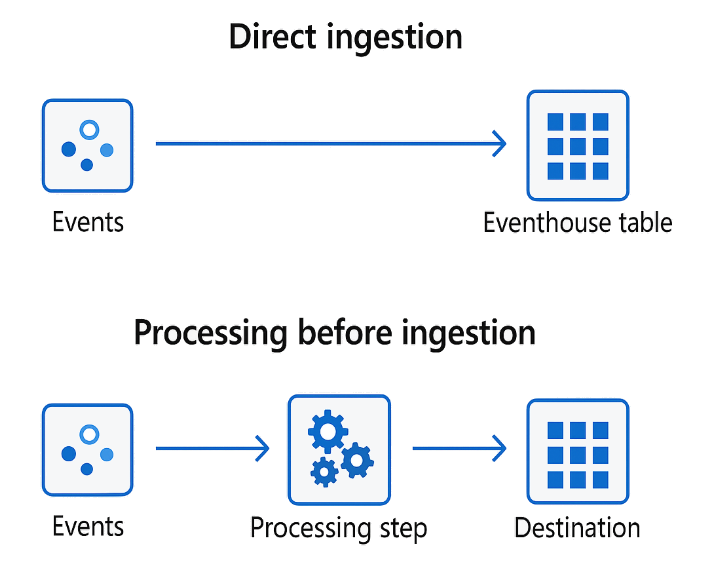
Once events have been ingested, the next step is processing. This is where we take the raw firehose of events and turn it into something meaningful and usable.

NOTE: We’re not talking about storing the events in a database, and then querying them. We can do that, but here we’re talking about transforming the events in-flight. It’s similar to what we could do with Azure Stream Analytics. I like the description that says that instead of throwing a query at the data, you’re throwing the data at a query.

2026-01-25

Fabric RTI 101: What is Ingestion?

Fabric RTI 101: What is Ingestion?

Ingestion is the very first step in any real-time architecture: getting events from wherever they originate and bringing them into where they can be processed, analyzed, and acted on.

Events typically start their lives in all kinds of different systems. They might come from Kafka topics in an enterprise environment, AMQP brokers in messaging-based systems, or from Azure-native services like Event Hubs or IoT Hub, which are especially common in cloud and IoT scenarios. Ingestion is what connects those sources into Fabric. Without it, you don’t have anything to work with.

2026-01-23

Fabric RTI 101: What are Streams?

Fabric RTI 101: What are Streams?

Once we understand what an event is, the next concept is the stream. A stream is simply a continuous flow of events over time. Instead of looking at events one by one in isolation, a stream is what you get when you treat them as a live feed coming from a source.

For example, imagine an IoT scenario. Each sensor reading from a device is an event. But when you look at all those readings flowing in second by second, that becomes a stream of telemetry. In a financial system, every transaction is an event — but all transactions flowing in from your payment gateway form a transaction stream.

2026-01-21