
Azure-Sql-Db

SDU Tools: ReservedWords, FutureReservedWords, ODBCReservedWords, SystemDataTypeNames, SystemWords

SDU Tools: ReservedWords, FutureReservedWords, ODBCReservedWords, SystemDataTypeNames, SystemWords

One of the things that I’ve always thought was missing in SQL Server and the T-SQL language was a built-in view that showed reserved words, and even better, future reserved words.

It’s one thing to say that you can create a policy to avoid people using reserved words for table, column, or object names, but how exactly do you know that the name you’ve chosen is one of those?

2018-05-30

SDU Tools: Print message without delay in T-SQL

SDU Tools: Print message without delay in T-SQL

When you are trying to debug code in SQL Server T-SQL, or trying to monitor where code is up to, it’s common to add PRINT statements into the code.

These are fine when they are ad-hoc statements, but if you include PRINT statements in stored procedure code, and the procedure runs for any length of time, you’ll know that you normally don’t get to see the PRINT output in the Messages tab until the procedure ends.

2018-05-23

SDU Tools: Read CSV File in T-SQL

SDU Tools: Read CSV File in T-SQL

One of the most common tasks that “data people” perform is moving data around, and that can include exporting existing database data, and importing data from other places.

While there are many other standards for how data is stored in files, CSV (comma-separated-value) files are still (by far) the most common. Another common variation are TSV (tab-separated-value) files, where tabs are used to separate values instead of commas. This is usually a good idea as commas occur frequently within the data.

2018-05-18

SDU Tools: Alphabetic Only and Alphanumeric Only in T-SQL

SDU Tools: Alphabetic Only and Alphanumeric Only in T-SQL

Sometimes you need to remove all characters from a string, except for a certain type of character. This often happens when processing incoming data from an external source, before you use it within your systems.

In our free DBA and developer SDU Tools, we added some functions to help with this.

AlphabeticOnly limits the output string to just alphabetic characters, based on the English language.

AlphanumericOnly limits the output string to just alphabetic characters (again based on the English language) or the digits from 0 to 9.

2018-05-09

SDU Tools: SQL Variant Info for T-SQL

SDU Tools: SQL Variant Info for T-SQL

If you aren’t aware of the SQL Server data type called sql_variant, don’t feel bad; you’re not alone. Many people who’ve worked with SQL Server for a very long time haven’t used it.

sql_variant is a very special data type. It’s the data type that you use when you need to store other data but you’re not sure what type you will need to store. Once it is stored though, it has the appropriate data type.

2018-05-02

SDU Tools: Update Statistics on SQL Server Tables

SDU Tools: Update Statistics on SQL Server Tables

Having up to date statistics is critical for SQL Server choosing appropriate query plans. Poor statistics can lead to poor query plan outcomes.

Generally, SQL Server manages this well by itself. As a rough rule, most versions auto-update statistics when the number of changes is about twenty percent of a count of the number of rows in the table. (Some recent changes have slightly altered how this works but the ball park is pretty good).

2018-04-25

SDU Tools: Table of Numbers in SQL Server T-SQL

SDU Tools: Table of Numbers in SQL Server T-SQL

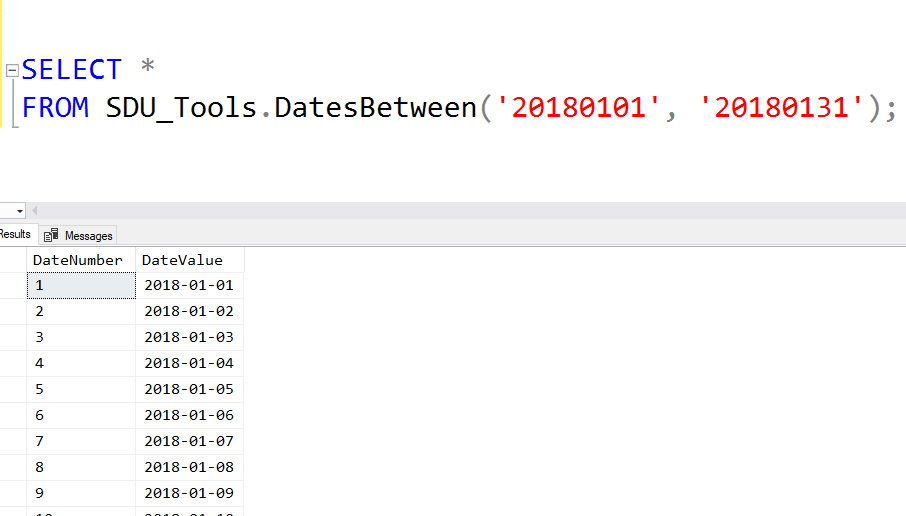
For anyone who’s worked with SQL Server for a long time, you’ll know that one of the common requests is that a table of numbers would be useful. Yes, just a table with 1, 2, 3, 4 and so on. Often in a query, you need just a certain set of values.

In our free SDU Tools, we’ve added a function to do that in a reasonably efficient way.

2018-04-18

SDU Tools: SQL Server System Configurations and What's Changed

SDU Tools: SQL Server System Configurations and What's Changed

When I first start working with any SQL Server system, one of the first things I want to look at is how the server has been configured.

More particularly, what I’m interested in is:

What has been changed from the default value?

None of the standard SQL Server system views, however, provides me with this info. We do have the sys.configurations view. It shows you the configurations and what’s been chosen, but it doesn’t show you what the default value was:

2018-04-11

SDU Tools: Seconds to Duration in T-SQL

SDU Tools: Seconds to Duration in T-SQL

There are a few places in T-SQL where instead of a time value, you need to work with a duration.

An example is if I want to sleep for a short period. In T-SQL, we can do that with the WAITFOR statement, used like this:

This command would cause SQL Server to wait for 10 minutes. One of the challenges though, is how do I create this duration string in a programmatic way? For example, how do I create the string ‘00:02:00’ if I’m starting with a value of 120 seconds?

2018-04-04

SDU Tools: Julian Day Number to Date in T-SQL (and reverse)

SDU Tools: Julian Day Number to Date in T-SQL (and reverse)

Working with dates and times in database systems and programming languages has always been “interesting”, at least interesting in the sense that the old Chinese curse meant when it said “may you live in interesting times”.

One of the curious variations though is the use of Julian day numbers. It’s a count of the number of days since the beginning of the Julian period: https://en.wikipedia.org/wiki/Julian_day

SQL Server doesn’t currently have a built-in function for converting to or from these so we added functions to our free SDU Tools for developers and DBAs. You can use the functions directly from our tool kit, or use them as examples of how to write these functions.

2018-03-28