Posts

Opinion: Which SQL Server columns should be nullable part 2: Avoid placeholder values

Opinion: Which SQL Server columns should be nullable part 2: Avoid placeholder values

In my previous opinion post, I was discussing why magic values where a problem. They are often added by developers when they are trying to avoid having any NULL data in a database.

While discussing this, I think it’s worth also highlighting the overall dangers of placeholder values. These are values that aren’t magic values but are ones that are intended to be replaced at a later time.

If you use any of these, you need to have a solid process in place to:

2018-04-17

General: PowerPoint - sorry we couldn't find slide1.PNG - Unexpected space

General: PowerPoint - sorry we couldn't find slide1.PNG - Unexpected space

Today, we were having trouble saving a PowerPoint slide deck as a set of PNG files.

The error message said:

Sorry we couldn’t find slide1.PNG. Is it possible that it was moved, renamed, or deleted?

After trying to copy the slides into another deck to replace the original deck, the same problem existed. Saving in PPTX format was fine. Curiously, saving individual slides was also fine.

I found a few blog posts online that said it might be to do with an embedded period in the filename. That wasn’t the case but it gave me the clue that I needed.

2018-04-16

SDU Tools: SQL Server System Configurations and What's Changed

SDU Tools: SQL Server System Configurations and What's Changed

When I first start working with any SQL Server system, one of the first things I want to look at is how the server has been configured.

More particularly, what I’m interested in is:

What has been changed from the default value?

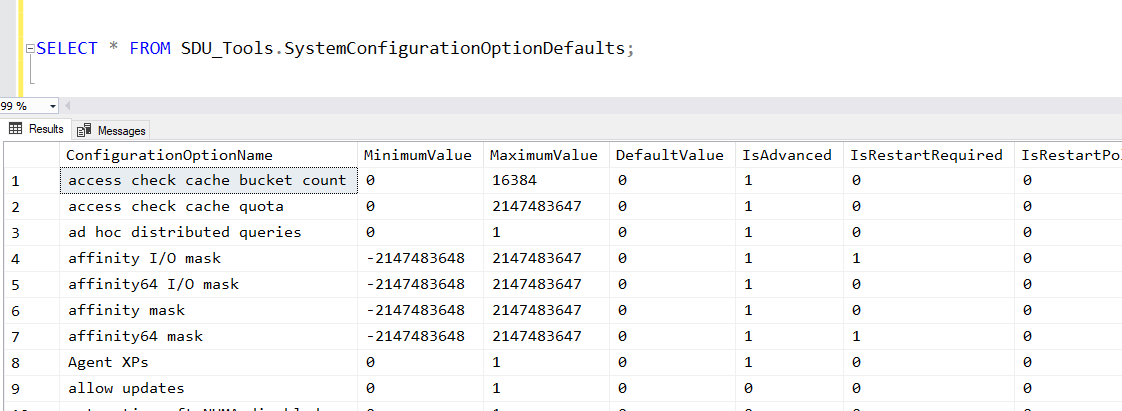
None of the standard SQL Server system views, however, provides me with this info. We do have the sys.configurations view. It shows you the configurations and what’s been chosen, but it doesn’t show you what the default value was:

2018-04-11

AI: New Microsoft Professional Program in Artificial Intelligence

AI: New Microsoft Professional Program in Artificial Intelligence

In the last year or so, there has been a quiet revolution going on with how Microsoft delivers training and certification.

Previously, the main option was Microsoft Official Curriculum (MOC) courses delivered by Certified Learning Partners. For some years, I’ve been saying that I don’t see that as the longer-term model for Microsoft. I believe that’s for three reasons:

  • The learning experiences team in Microsoft have needed to be a profit center.
  • The product groups want as much information out there as possible and as free as possible.
  • The creation and delivery processes for MOC courses don’t lend themselves well to constantly-evolving information.

That has to lead to real challenges within the company.

2018-04-06

SSMS: Navigate as you type in sorted SSMS Object Explorer Details pane

SSMS: Navigate as you type in sorted SSMS Object Explorer Details pane

I’ve mentioned a number of times how useful I think the Object Explorer Details panel is in SQL Server Management Studio.

Another option in that panel that might not be so obvious is the sorted navigation. Here’s an example.

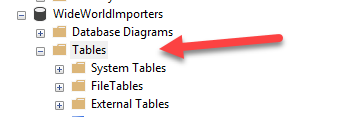
I’ve opened WideWorldImporters in Object Explorer, and clicked on the Tables node:

I then hit F7 to open the Object Explorer Details pane, and click the Name heading to sort the table list:

2018-04-05

SQL: Is there a place for AutoClose in SQL Server databases?

SQL: Is there a place for AutoClose in SQL Server databases?

If you’ve hung around the SQL Server community for any length of time, you’ll have heard the endless jibes about the AutoShrink option for databases. Using it is almost always a bad idea. In fact, shrinking databases is typically not a great idea but the AutoShrink option is considered universally bad and there are calls for it to be removed as an option.

We often joke that “auto shrink” should be renamed to “auto fragment my filesystem”, because that’s typically the outcome.

2018-04-02

DevOps: Human testing is still critical - and make sure they can spell

DevOps: Human testing is still critical - and make sure they can spell

I’ve spent a lot of time lately working with automated testing systems.

Unit tests are great for checking blocks of code, etc. but integration tests and functionality tests are critical to projects. An area that is still tricky though is UI testing. There are some really good tools for this.

Selenium has been very popular and works well if you access it programmatically. There are good framework libraries for .NET and we’ve been using those. Selenium also had a pretty good IDE that could be used for recording but it’s pretty much adrift now as it was based on an older version of Firefox and doesn’t work on the latest versions. You could install it on an older version for testing but those versions aren’t safe to use so the recommendation is to avoid it. Working with it programmatically is not that hard though.

2018-03-30

SSMS: Filters in Object Explorer within SQL Server Management Studio

SSMS: Filters in Object Explorer within SQL Server Management Studio

If you are working with databases with large numbers of objects, the contents of Object Explorer in SQL Server Management Studio can start to become a bit overwhelming. I have to admit that I don’t understand why it doesn’t offer an option to group by schema. That would be helpful.

But you can at least filter by things like schema, when you need to work with a specific set of objects. You’ll notice that if you click on the database name, that the filter in the toolbar is grayed out, but if you click on a node below that like Tables, you can click on the toolbar filter icon. You can also right-click the node and choose to filter:

2018-03-29

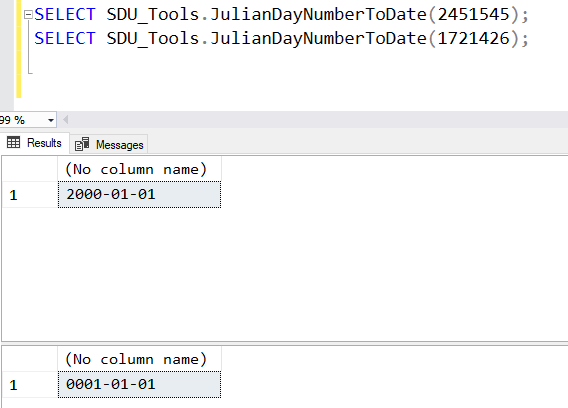
SDU Tools: Julian Day Number to Date in T-SQL (and reverse)

SDU Tools: Julian Day Number to Date in T-SQL (and reverse)

Working with dates and times in database systems and programming languages has always been “interesting”, at least interesting in the sense that the old Chinese curse meant when it said “may you live in interesting times”.

One of the curious variations though is the use of Julian day numbers. It’s a count of the number of days since the beginning of the Julian period: https://en.wikipedia.org/wiki/Julian_day

SQL Server doesn’t currently have a built-in function for converting to or from these so we added functions to our free SDU Tools for developers and DBAs. You can use the functions directly from our tool kit, or use them as examples of how to write these functions.

2018-03-28

Opinion: Don't write CREATE UNIQUE INDEX (ok, well not too often)

Opinion: Don't write CREATE UNIQUE INDEX (ok, well not too often)

The CREATE INDEX statement is used to do exactly what its name says, it creates an index. But when you say CREATE UNIQUE INDEX, you are doing more than that; you are enforcing a business rule that involves uniqueness.

I have a simple rule on this. Wherever possible business rules like uniqueness, check values, etc. should be part of the design of the table, and not enforced in an external object like an index.

2018-03-27