Azure-Sql-Db

SDU Tools: StartOfFinancialYear, EndOfFinancialYear

SDU Tools: StartOfFinancialYear, EndOfFinancialYear

SQL Server 2012 added the function EOMONTH. It returns the end of the month. That’s useful but there are two things that bug me about it:

First: What’s with the name? Do we really have to save 3 characters from ENDOFMONTH, particularly when the same version added functions like DATETIMEOFFSETFROMPARTS? When I asked, I was told it was the name of the function in Excel. I can’t admit to being happy that SQL Server and T-SQL is following the naming of a function that someone added to Excel in the 1980’s in some adhoc way.

2017-11-17

SDU Tools: DateDiffNoWeekends

SDU Tools: DateDiffNoWeekends

There is a SQL Server T-SQL function that calculates the number of days (or months, or years, or other time periods) between any two dates.

SELECT DATEDIFF(day, 'firstdate', 'seconddate');

But I regularly get asked how to work out the number of days between two dates, excluding the weekends (Saturday and Sunday).

I’ve seen a few functions around that do a pretty good job at this but many don’t work properly if you have DATEFIRST changed in your session ie: if you change the first day of the week.

2017-11-15

SDU Tools: Sleep

SDU Tools: Sleep

Most of the time, we want SQL Server T-SQL queries to run as fast as possible, just the same as we want programs in any programming language to run as fast as possible.

But there are times when you want SQL Server to just sleep for a while, and without tying up system resources (like spinning around on the CPU).

Example of this would be waiting for new entries in Service Broker queues, or waiting to retry deadlocks.

2017-11-10

SDU Tools: Translate

SDU Tools: Translate

I love it when SQL Server gets brand new T-SQL language features.

SQL Server 2017 added a great new language feature called TRANSLATE. It’s been in some other products like Oracle for a while but it’s just been added to SQL Server.

image

Imagine I have a string like this:

’[02] 9992:2343’ 

But what I really want is one like this:

’(02) 9992-2343’

Up to SQL Server 2016, I could do this with a series of replace statements:

2017-11-08

SDU Tools: Empty Schema

SDU Tools: Empty Schema

Occasionally I run into a need to clear out all objects in a schema in a SQL Server database. Sometimes it’s because I want to remove the schema itself. It’s often painful to do as I have to find all the types of T-SQL objects, and then often have to remove them in a particular order.

So I added a tool to my SDU Tools collection to do just that.

2017-11-03

SDU Tools: Invert String in T-SQL

SDU Tools: Invert String in T-SQL

I recently shipped the latest update to my SDU Tools collection.

This time I decided to add a tool that’s in the “cute” category. It’s called InvertString and you can see it action in the image above.

Yes, it takes an input string and returns a string that looks quite like an upside down version of the same string.

As part of the inversion I also reversed the order of the string so when you look at it upside down, it still looks correct. But if what you really want is a mirror image, you could combine it with REVERSE to achieve that outcome:

2017-10-31

SDU Tools: More free SQL Server developer and DBA tools: May SDU Tools Release

SDU Tools: More free SQL Server developer and DBA tools: May SDU Tools Release

Hi Folks,

We’ve just created the May 2017 update for SDU Tools. We’re pretty excited about what we’re delivering this month.

The first part that we’ve added is a set of tools to make it really, really easy to capture a performance query trace, to load it, and to perform a basic analysis of it. There are three tools involved in this:

  • CapturePerformanceTuningTrace – Just give the trace a name, say where it should be stored, which databases to filter on (if any), and how long you want the trace to run. We do the rest.
  • LoadPerformanceTuningTrace – This tool loads the completed trace into a table.
  • AnalyzePerformanceTuningTrace - And then we find the things in the trace that are of interest – automatically

Next, we’ve added a useful tool to help with your database consistency. I often run into databases where columns that hold the same information are defined differently across the database.

2017-05-07

SDU Tools: Right-aligning numbers in T-SQL

SDU Tools: Right-aligning numbers in T-SQL

When you output a series of numbers in T-SQL, people often want to right-align the numbers. So instead of numbers that look like this:

image

They want an output that looks like this:

image

Now the first thing to understand is that this is generally a client-tool or program issue, not a T-SQL issue. I ran these queries in SQL Server Management Studio and it could just as easily have decided to show me numbers right-aligned.

2017-04-09

SDU Tools: PascalCase and camelCase strings in T-SQL

SDU Tools: PascalCase and camelCase strings in T-SQL

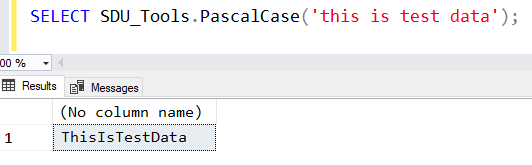
Yesterday, I discussed changing the case of T-SQL strings to ProperCase, TitleCase, SnakeCase, and KebabCase.

But there are other case options that can be needed. For example, often when I’m programmatically generating code, I want to create identifiers for objects. While many people will use SnakeCase for that, in Microsoft-related land (particularly around .NET), it’s common to use both PascalCased and camelCased strings.

In the April2017 update to SDU_Tools, we added functions to do all of the above. SDU Tools is a free library for SQL Server developers and DBAs. You can easily just add it to your database, then call the functions as needed. The functions get added in a separate schema and are easy to remove later if you ever wish to. (We hope you won’t want to). They’re also easy to upgrade.

2017-04-08

SDU Tools: Converting T-SQL strings to Proper Case, Camel Case, Snake Case, or Kebab Case

SDU Tools: Converting T-SQL strings to Proper Case, Camel Case, Snake Case, or Kebab Case

Often when I’m moving data around (usually with SSIS but also with just T-SQL), I need to take text that is all capitalized or simply has messed-up capitalization, and convert it to something that looks better (and more human readable) in the target system.

The most common option for me is conversion to Proper Case. Here’s an example. Let’s start with the following text:

image

On a webpage or report, that’s going to look downright ugly. In the March 2017 update to SDU_Tools, we added functions to do all of the above. SDU Tools is a free library for SQL Server developers and DBAs. You can easily just add it to your database, then call the functions as needed. The functions get added in a separate schema and are easy to remove later if you ever wish to. (We hope you won’t want to). They’re also easy to upgrade.

2017-04-07