Business-Intelligence

ADF: Changing or removing your Git connection from an Azure Data Factory

ADF: Changing or removing your Git connection from an Azure Data Factory

I’ve been working a lot with ADF (Azure Data Factory) again lately. If you’ve started to work with ADF and aren’t using Git in conjunction with it, you need to change that now.

ADF objects are also represented as JSON objects and lend themselves nicely to being stored in Git.

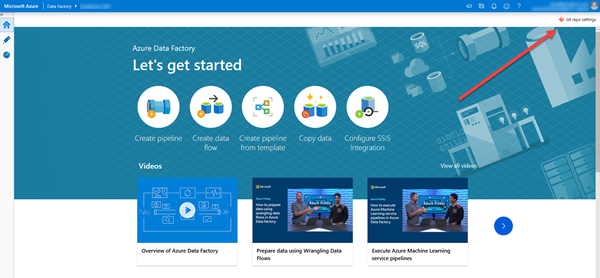
Another key advantage is that if you don’t have Git connected, when you’re working with ADF, you don’t have a Save button. If you’re part way through making changes, you can either Publish them or Discard All. When you have Git in place, you get an option to Save.

2020-02-21

BI: (Workaround) Changing partitioned tables in SSDT tabular designer

BI: (Workaround) Changing partitioned tables in SSDT tabular designer

I was working with a client the other day and we had what we thought was a simple situation:

  • A table in an SSAS tabular model project
  • The table had two partitions
  • We needed to remove 6 columns from the table

So, we’d already removed the 6 columns from the SQL Server view that the tables were being loaded from. We just needed to update the tabular model.

Now for an unpartitioned table, that’s easy. You open the table properties, click Design, wait for a moment, click below the query, then on the Query menu, click the option to Refresh. When you then click Import, you can then save the changes. We do that all the time.

2020-02-14

Power BI: (Workaround) Times disappear when datetime values are displayed in PBI tables

Power BI: (Workaround) Times disappear when datetime values are displayed in PBI tables

I’ll start this post by mentioning that there’s a general consensus that you should avoid columns in tabular data models that have both dates and times. That’s largely because they don’t compress well. However, sometimes you really do need to have both a date and a time in a single column.

For example, if you want to sort one column by the date and time, we have no option to sort one column by two other columns. And if you’re going to create a composite column to get around that, you’re really back in the same problem as storing a datetime anyway.

2020-01-31

Power BI (Bug): Power BI Desktop auto-hides visible tables with all columns hidden

Power BI (Bug): Power BI Desktop auto-hides visible tables with all columns hidden

I have a client who’s publishing their tabular data models to Azure Analysis Services (AAS). They want to publish a table that’s visible, but only has a single column that’s hidden.

You might wonder why he wanted to do that.

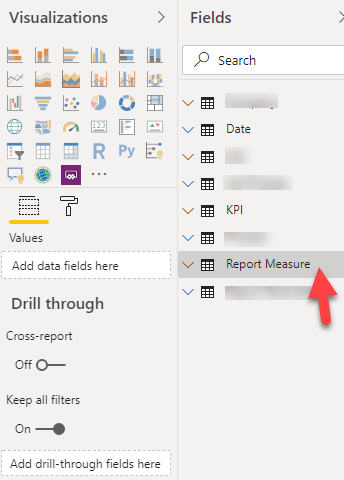
He’s trying to have a table with no existing columns that’s an anchor point for report designers to attach their report-specific measures.  There are measures and computed columns in the tabular data model in AAS. But he wants to have a known location for measures that are only related to the specific report.

2020-01-24

BI: Wondering where you Integration Services Connector for Power Query has gone in Visual Studio 2019?

BI: Wondering where you Integration Services Connector for Power Query has gone in Visual Studio 2019?

I wrote recently about menu items being missing from SSIS and other BI projects in VS2019, but another thing that’s gone MIA is the Integration Services Connector for Power Query.

This is the connector that allows you to use Power Query (and the M language) to input data into SSIS.

The SSIS designer for VS2019 recently went GA (general availability). It’s great that it’s released, but if you install it, you’ll find it removes the Power Query option for SSIS.

2020-01-01

BI: Wondering why your SSRS, SSAS, and SSIS menus are missing in Visual Studio 2019?

BI: Wondering why your SSRS, SSAS, and SSIS menus are missing in Visual Studio 2019?

If you’ve recently installed Visual Studio 2019 (VS2019), and then installed the SQL Server Reporting Services (SSRS), the SQL Server Analysis Services (SSAS), and/or SQL Server Integration Services (SSIS) extensions, when you open a project you might be wondering where your menus went.

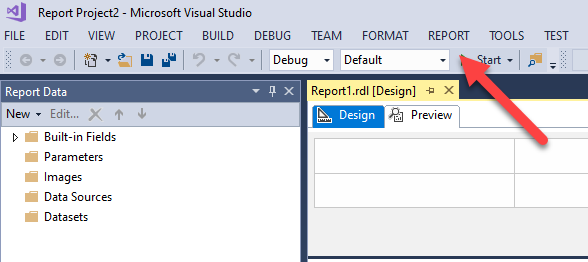
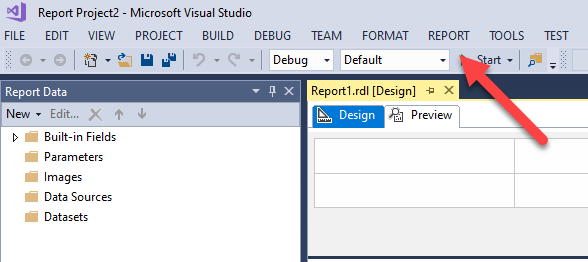
How it was

For example, if you had a report open in the VS2017 report designer, this menu was present:

And if you had an AS model open in the VS2017 tabular designer, these menus were present:

2020-01-01

Spatial Data: If you are working with Australian mapping data, Mappify.io is worth knowing about

Spatial Data: If you are working with Australian mapping data, Mappify.io is worth knowing about

I spend quite a bit of each year working with spatial data (i.e. mostly mapping data but sometimes other data). One of the constant challenges is where to find the spatial data. Another challenge is where to find services that can help you to work with the data.

For Australian data, if you haven’t considered Mappify.io, I think you should take a look.

You need to create an account before you start but it’s free to create an account to try it out. Then there are a number of services.

2019-11-12

Snowflake for SQL Server Users - Part 8 - Case Sensitivity

Snowflake for SQL Server Users - Part 8 - Case Sensitivity

There are many things I like about Snowflake. How they handle case and collations is not one of them.

There are currently no rich options for handling case like you have in SQL Server, with detailed options around both collations, and case sensitivity.

I’ve previously written about how I think that case-sensitivity is a pox on computing. I see absolutely no value in case-sensitivity in business applications, and a significant downside.

2019-09-27

Snowflake for SQL Server users - Part 5 - Editions and Security Features

Snowflake for SQL Server users - Part 5 - Editions and Security Features

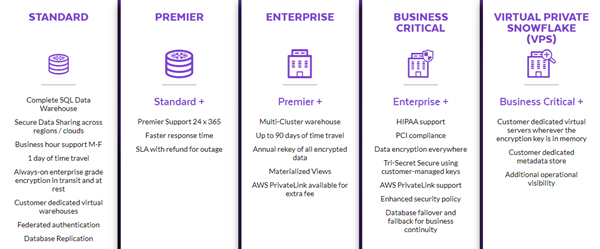
Like most products, Snowflake comes in a number of editions, and you can see the current editions in the main image above. (Keep in mind that they could always change at any time and to check their site for the current options).

First thing I need to say is that I really like the way that most of the SQL code surface is pretty much identical across editions. I wish that was complete coverage but it currently doesn’t include materialized views.

2019-09-06

Opinion - Modern isn't a synonym for Better

Opinion - Modern isn't a synonym for Better

I’ve been in the IT industry a long time. I see trends come and go. (Mostly they go). At this point, I think I’m an OK judge of what’s going to fly and what isn’t. (Far from perfect but OK).

One thing that always puzzles me though is the way the word Modern is used as a put-down for things that aren’t modern, as though it’s a synonym for the word Better.

2019-09-03