
Fabric RTI 101: Building Alert-Driven Workflows

In recent posts, I’ve focused on dashboards and visualizations — but real-time intelligence goes beyond that. The real power comes when your system doesn’t just display insights but can act on them automatically.
Dashboards are great for monitoring, but most people can’t sit and watch a dashboard all day. Instead, we can use alerts and automation to make the data work for us.
There are a few ways to do this in Microsoft Fabric and the broader Power Platform: Power BI Alerts can be set up on tiles or visuals. They monitor thresholds — like sales dropping below a target — and notify users when conditions are met.
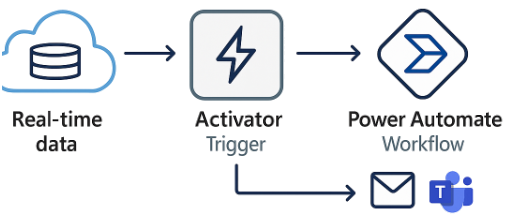
Fabric Activator takes that concept further. It connects directly to Eventstreams, KQL databases, or Real-Time Dashboards and allows you to define triggers based on live data conditions. For example, if a sensor reading exceeds a limit or an error rate spikes, Activator can launch an action immediately.
These actions often integrate with Logic Apps or Power Automate. That’s where you can define what happens next — such as sending an alert to Microsoft Teams, creating a ServiceNow ticket, or even invoking an API to start an automated remediation process.
The result is a proactive workflow — one that detects events as they happen, not after the fact.
By combining Fabric Real-Time Intelligence, Activator, and Power Automate, you can move from reactive monitoring to proactive intelligence — where your analytics actually drive the response.
This shift turns your streaming data from something you observe into something that takes action, closing the loop between insight and outcome.
I’ll discuss Fabric Activator in more detail in later blog posts.
Learn more about Fabric RTI
If you really want to learn about RTI right now, we have an online on-demand course that you can enrol in, right now. You’ll find it at Mastering Microsoft Fabric Real-Time Intelligence
2026-07-04