
Fabric RTI 101: Basic KQL query syntax

Let’s look at how a basic KQL query is structured.
Every KQL query starts with a table — that’s your starting dataset, like Events, Logs, or Telemetry. From there, you build a pipeline of operations using the pipe (|) symbol, which passes the output of one operation into the next.
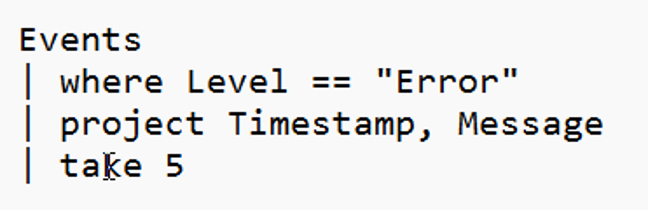
The most common first step is to filter the data using the where operator. It works just like a SQL WHERE clause but uses a more natural, functional syntax. For example:
Events
| where Level == "Error"
That filters your table down to only the rows you care about.
Next, you can use project to select specific columns — similar to SELECT in SQL, but again, it feels more pipeline-oriented:
| project Timestamp, UserId, Message
That step just keeps the columns you want to work with.
Finally, you can use take to limit how many rows are returned — for example:
| take 10
That’s especially helpful when you’re exploring large datasets and just want to see a quick sample of the output.
What’s nice about KQL is that it’s composable — you can chain together as many steps as you like, and each one is easy to read. You can almost think of it like reading a sentence: start with this table, filter it, pick these columns, then take a few rows. That pipeline model is what makes KQL so approachable — it’s simple, expressive, and great for building up queries incrementally.
Learn more about Fabric RTI
If you really want to learn about RTI right now, we have an online on-demand course that you can enrol in, right now. You’ll find it at Mastering Microsoft Fabric Real-Time Intelligence
2026-06-08