
SQL: Allowing specific non-sysadmin users to query group membership for a login
I had a lot of good feedback on my recent post about how to query group membership for a given login.
One tricky additional question was about how you could let a specfic user be able to find the group membership for another login, without the user being a sysadmin to run the code.
Now doing that is a bit trickier but can be done by creating a certificate, a login from the certificate, then assigning permissions to that login, and finally applying a digital signature to the procedure using the certificate.
Here’s a walkthrough:
Let’s start by creating a certificate that we’ll use for this purpose:
USE master;
GO

CREATE CERTIFICATE WindowsGroupAccessCertificate
  ENCRYPTION BY PASSWORD = 'VerySecretStuff'
  WITH SUBJECT = 'Windows Group Lookup Access Certificate',
       EXPIRY_DATE = '99990101';
GO
Note: Make sure you use an appropriate password.
Next, we create a login from that certificate. Note that this isn’t a login that can actually log in, but is used as a container for the required permissions:
CREATE LOGIN WindowsGroupAccessLogin
FROM CERTIFICATE WindowsGroupAccessCertificate ;
GO
We need to then add that special new login to the sysadmin role so they can IMPERSONATE any login:
ALTER SERVER ROLE sysadmin
ADD MEMBER WindowsGroupAccessLogin;
GO
Then we create the stored procedure using the same techniques as I mentioned last time. It would be much simpler if we could just use WITH EXECUTE AS in the procedure to temporarily become an administrator but that doesn’t work.
CREATE OR ALTER PROCEDURE dbo.GetWindowsGroupsForLogin
@LoginName sysname
AS
BEGIN
    EXECUTE AS Login = @LoginName;

    SELECT principal_id AS PrincipalID,
           [sid] AS SecurityID,
           [name] AS GroupName,
           usage AS GroupUsage
    FROM sys.login_token
    WHERE [type] = N'WINDOWS GROUP';
END;
GO
We then digitally sign the stored procedure using the certificate. This will give anyone that runs the stored procedure sysadmin permission but only while they are running the procedure, and only if the procedure has not been modified in any way. Any change to the procedure will cause the digital signature to be dropped:
ADD SIGNATURE TO dbo.GetWindowsGroupsForLogin
BY CERTIFICATE WindowsGroupAccessCertificate
WITH PASSWORD = 'VerySecretStuff';
GO
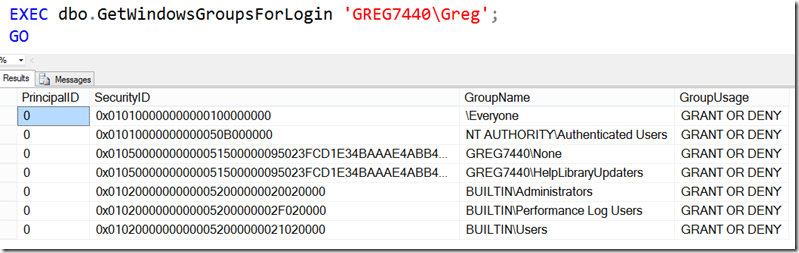
Just to check that the procedure works ok, I’ll run it as myself first:
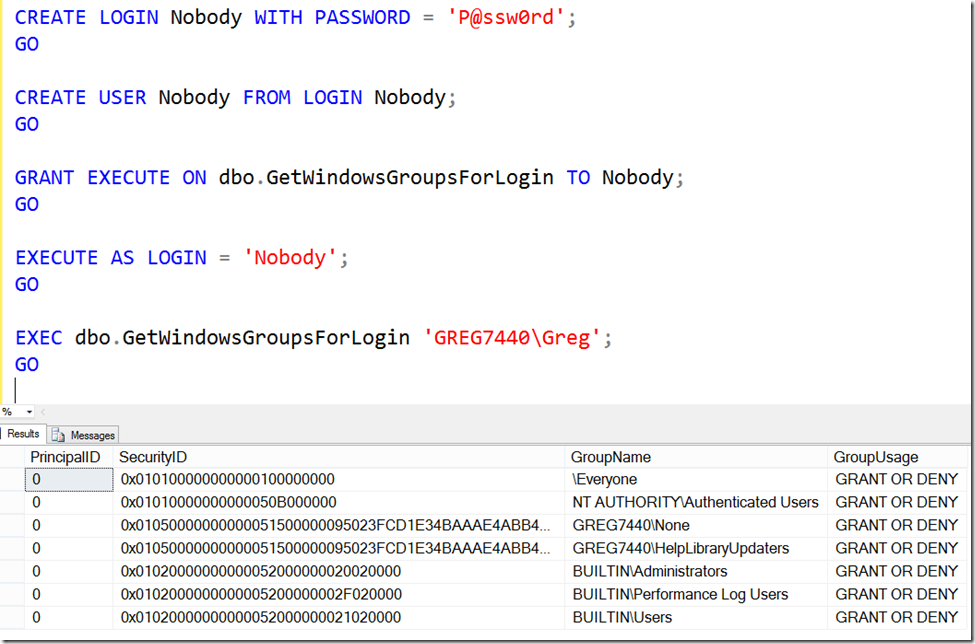
That’s all good so let’s now work out if another user can run it:
Hope that helps someone!
2026-06-07