Ssms

SSMS: Using Snippets in SSMS to Improve the Drop Database Statement

SSMS: Using Snippets in SSMS to Improve the Drop Database Statement

In an earlier post, I showed how to create a DROP DATABASE template in SQL Server Management Studio (SSMS). At the time, I mentioned that a template wasn’t the best option because a command like this is normally inserted into a script; it’s not the whole script.

That’s where snippets shine. Let’s create a snippet for it.

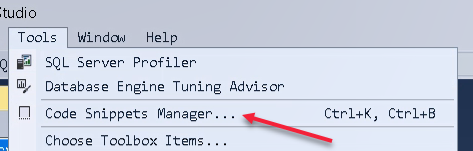
First let’s open Code Snippets Manager (Tools > Code Snippets Manager):
You’ll see the existing snippet folders. I’ve clicked Add, then created a new folder called GL_Snippets.

2018-01-11
SSMS: Creating T-SQL Templates in SQL Server Management Studio (SSMS)

SSMS: Creating T-SQL Templates in SQL Server Management Studio (SSMS)

A few weeks back, I mentioned how useful templates can be. I said that I’d discuss how to create them later. Well that’s today.

I thought I’d take dropping a database as an example. The supplied template doesn’t work for me, so let’s create a new one.

Note: SQL Server 2016 SP1 introduced DROP DATABASE IF EXISTS but I find that option quite useless. It fails if anyone is connected to the database. And to disconnect people beforehand, you need to first check if it exists, so the statement is pointless.

2018-01-04

SSMS: Using Colors to Avoid Running Scripts Against the Wrong Server

SSMS: Using Colors to Avoid Running Scripts Against the Wrong Server

Everyone who’s worked with SQL Server for any length of time, has had the experience of executing a T-SQL script, and then noticing, with horror, that they’ve just executed the script against the wrong server.

You know the feeling. It even happens at Christmas time, just when you were hoping to get away from work for a few days, or when you are the unlucky one who’s doing on call work.

2017-12-28

SSMS: Using Templates in SQL Server Management Studio (SSMS)

SSMS: Using Templates in SQL Server Management Studio (SSMS)

A week or so ago, I wrote about how to use Snippets in SQL Server Management Studio (SSMS) when you can’t remember the syntax of how to create objects in T-SQL.

Snippets were added reasonably recently compared to templates, which are more appropriate when you are creating an entire script file for a new object. They are easy to use too yet because they don’t appear on the screen by default, many people don’t even realize that they are there. Let’s take a look.

2017-12-07

SSMS: Replace Tabs with Spaces and do Macro-like work in SSMS using Regular Expressions

SSMS: Replace Tabs with Spaces and do Macro-like work in SSMS using Regular Expressions

There are so many useful things in SQL Server Management Studio (SSMS) and daily, I come across users who aren’t aware of common useful functions.

A request that I hear all the time, is “I don’t like tabs but insert name of annoying colleague here decided he likes to use them. How do I remove them?” Now SSMS allows you to choose to use spaces instead of tabs (in Tools > Options) but that doesn’t fix existing tabs.

2017-11-30

SSMS: Selecting and modifying rectangular regions in SSMS

SSMS: Selecting and modifying rectangular regions in SSMS

I often see people using SQL Server Management Studio (SSMS) and doing very repetitive editing tasks that could easily be carried out by using the selection and changing of rectangular regions of code.

The simplest example of doing this is to insert a bit of text on a number of rows. Take the following code as an example:

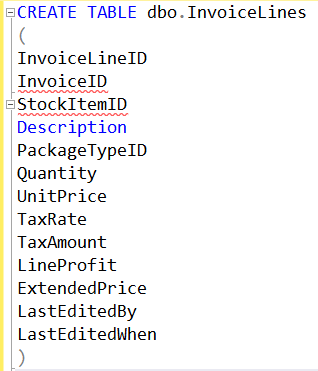
I’ve got the skeleton of a list of columns in a CREATE TABLE statement but let’s assume that I’m a “comma in front” person and want to put a few spaces and a comma, etc. in front of each column after the second. I could just put the cursor on the InvoiceID line and type what I wanted, then do the same again on the next line. I could do it on the first line, then select and copy it, and insert it into the front of every other line. But what I should do is put the cursor in front of InvoiceID, and while holding Alt-shift, use the down arrow to select the beginning of every line, then just type what I want.

2017-11-23

SSMS: Snippets in SQL Server Management Studio

SSMS: Snippets in SQL Server Management Studio

Have you ever started to create an object using T-SQL in SQL Server, and thought, what’s the right syntax for this? I’ve worked with SQL Server since 1992 (version 4.2) and yet almost every time I go to create a function, I have to spend a few moments thinking about what the correct syntax is, because there are different types of functions (scalar vs table-valued, inline vs multi-statement).

SQL Server Management Studio has had templates for a long time, and they are useful. In fact, you can create your own. I’ll show that in another blog post soon.

2017-11-16

SSMS: Dragging all column names from Object Explorer

SSMS: Dragging all column names from Object Explorer

This is a really popular shortcut in SQL Server Management Studio (SSMS) but I continue to be amazed how many people aren’t aware of it.

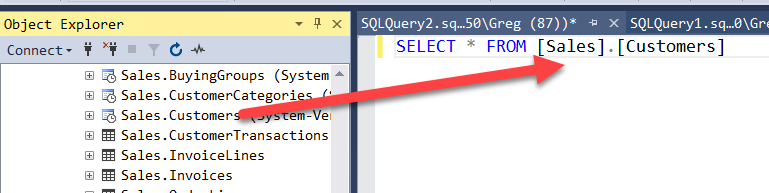
Object Explorer is a very useful part of SSMS and you can drag pretty much any name that you see in it, across to a query window.

You could do the same for each column in the Columns list.

You might also realize that you can hover over the asterisk and see a list of columns:

2017-11-09

SQL: Replacing all tabs in your SSMS query window with spaces

SQL: Replacing all tabs in your SSMS query window with spaces

I know that there is an eternal tabs vs spaces debate that goes on in development teams. Currently I’m in the spaces team for SQL queries, but I completely understand the rationale for using tabs instead. I just find that some of the tooling I’m using doesn’t play nicely with tabs.

So, it’s painful when I receive a script file from someone and it’s full of tabs. Even worse when there are a bunch of tabs at weird tab positions. And I start to edit it, and things jump around, and I think @#$@$!@#$@#$ tabs !

2017-02-28

Warning: Lost my stored Azure credential details in SSMS after applying CU3 + Hotfix

Warning: Lost my stored Azure credential details in SSMS after applying CU3 + Hotfix

I posted the other day about a hotfix that’s needed after you apply SQL Server 2012 SP1 CU3, to still be able to open or edit SSIS projects or database maintenance plans in SSDT.

However, I found that after I applied CU3 and the hotfix, that all my stored credential details for SQL Servers was gone. That was particularly nasty for all my Azure-related logons. I had to set them up again.

2013-04-09