The Bit Bucket

Fabric: What range of dates to include in a semantic model date table

Fabric: What range of dates to include in a semantic model date table

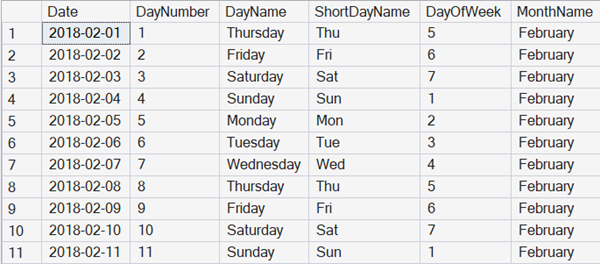
One of the most important tables in any business intelligence style analytic system is a Date table.

In most formal documentation, that’s ironically referred to as a time dimension, but in so many systems, time isn’t part of it. That’s because the exact time that something happened often isn’t of interest for the aggregated data that often forms the majority of analytic analysis.

Storing time?

Do we ever store the time though?

2025-12-13
Book Review: Introduction to .NET Aspire

Book Review: Introduction to .NET Aspire

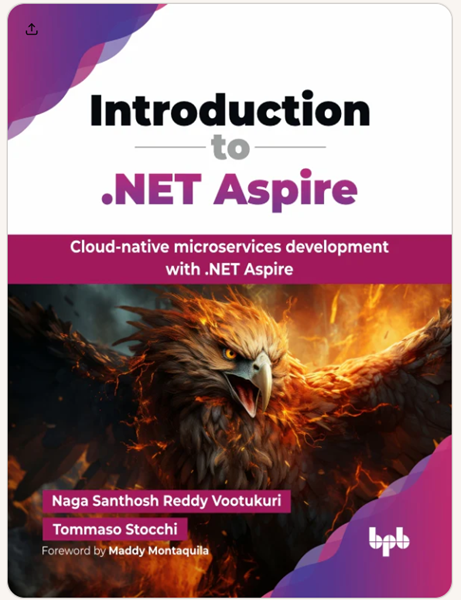
I recently received a review copy of Introduction to .NET Aspire: Mastering Cloud-Native Microservices Development with .NET Aspire by Naga Santhosh Reddy Vootukuri and Tommaso Stocchi from my friends at BPB Publications.

Authors

Naga Santhosh Reddy Vootukuri works for Microsoft as a Principal Software Engineering Manager in the Azure SQL product. He has deep knowledge in cloud computing, distributed systems,AI, microservice-based architecture, and cloud-native apps. Santhosh has authored and published numerous research articles in peer-reviewed and indexed journals and in major trade publications. He is a core MVB blogger at DZone and an active senior IEEE member handling various conferences as technical chair in the Seattle IEEE region. Naga has been awarded the prestigious Docker Captain membership program for his outstanding contributions to the Docker and containers community.

2025-12-12

SSMS Tips and Tricks 7-19: Comparing scripts and other files

SSMS Tips and Tricks 7-19: Comparing scripts and other files

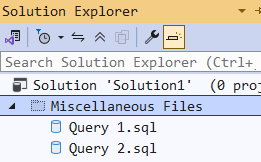
When you create a new query file in SSMS, it automatically becomes part of a solution. You can view it in Solution Explorer. In this example, I have created two query files, and renamed the tabs without saving them, as Query 1 and Query 2:

They are in the Miscellaneous Files section as they weren’t part of a script project.

SSMS can now compare multiple files. If I highlight both the files, and right-click, I get this option:

2025-12-11

Reporting Services for SQL Server Express discontinued

Reporting Services for SQL Server Express discontinued

One surprise in the release plans for SQL Server 2025 is that SQL Server Reporting Services (SSRS) is being discontinued as a brand. If you have a paid license for SQL Server, you are now able to install Power BI Report Server. Previously, that option required you to have an Enterprise Edition license for SQL Server or a premium level license for Power BI.

But Reporting Services was also previously available for SQL Server Express. That will no longer be supplied, and there’s no option to use Power BI Report Server.

2025-12-10

SQL Interview: 95 Are ISNULL and COALESCE the same for two parameters?

SQL Interview: 95 Are ISNULL and COALESCE the same for two parameters?

This is a post in the SQL Interview series. These aren’t trick or gotcha questions, they’re just questions designed to scope out a candidate’s knowledge around SQL Server and Azure SQL Database.

Section: Development Level: Medium

Question:

If you have two values where you want to return the first if it’s not NULL, and otherwise return the second, is there any difference at all between using the ISNULL and COALESCE functions?

2025-12-09

SSMS Tips and Tricks 8-7: Renaming tabs that have not been saved

SSMS Tips and Tricks 8-7: Renaming tabs that have not been saved

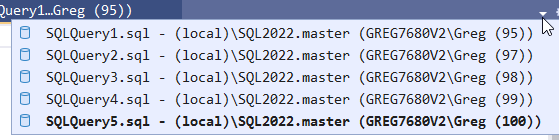
Anyone who has worked with SSMS for long, will have the experience of opening a number of query windows for short-term work, not wanting to save the scripts, and then being unable to find the one they want in the drop-down list of scripts:

The alternative to this was to save them all somewhere so you could give them a name. Then you need to clean them all up later.

2025-12-08

SSMS Tips and Tricks 1-14: Pane options in Edit N Rows

SSMS Tips and Tricks 1-14: Pane options in Edit N Rows

(Thanks to Klaus Oberdalhoff for this one)

Klaus noted that when EDIT TOP n is used, only the result is displayed. That’s different to the SELECT TOP n option where the query appears as well and can be edited.

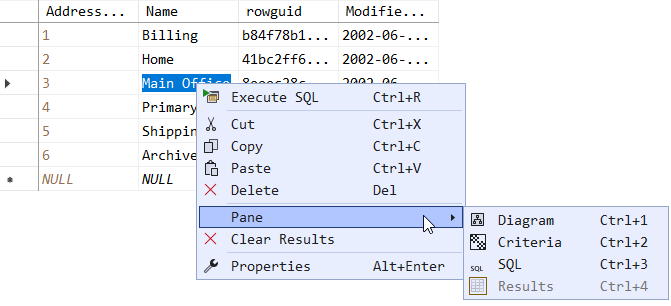
However, after executing EDIT Top n, in the table displayed, right-click and you’ll see a menu item for Pane.

The sub-menu has the following options:

  • Diagram - Shows the underlying table as a database diagram
  • Criteria - Shows the graphical query editor
  • SQL - The SQL script that was used to open the editor
  • Results - Hides or shows the editable table

Diagram

This option leads to a database diagram like this:

2025-12-07

SQL Interview: 94 SQL Server understanding of date strings

SQL Interview: 94 SQL Server understanding of date strings

This is a post in the SQL Interview series. These aren’t trick or gotcha questions, they’re just questions designed to scope out a candidate’s knowledge around SQL Server and Azure SQL Database.

Section: Development Level: Medium

Question:

If you pass the following string to SQL Server, will it always reliably be understood as 7th October 2025 by the date, datetime, and datetime2 data types?

'2025-10-07'

If not, why not?

Answer:

No, while that is true for date, and datetime2, the value that will be cast for the datetime data type depends upon the regional settings. For example, in British English, a string in the format ‘XXXX-XX-XX’ will be read as ‘YYYY-DD-MM’.

2025-12-06

SSMS Tips and Tricks 7-18: Opening shortcuts

SSMS Tips and Tricks 7-18: Opening shortcuts

(Thanks to César F. for this one)

If you are working with many script files and they are all over your disk/storage, it can be painful to need to keep navigating whenever you want to open one.

However, when you use the File > Open > File option in SSMS, the dialog that opens up is capable of opening operating system shortcuts, and not just files. This means that you can have a folder of shortcuts and every time you need to open one of these files, you can just have it open the same location.

2025-12-05

Opinion: Most Corporate Compliance Training Isn't Training and Doesn't Work

Opinion: Most Corporate Compliance Training Isn't Training and Doesn't Work

Recently, I read a news report about a study that concluded that cybersecurity training doesn’t work. I can’t say that I’m surprised by that.

I spend a lot of time mentoring on client sites, and many of the clients are large organizations. Often these organizations require me to attend “training” on a regular basis, to satisfy their corporate compliance goals.

I don’t mind doing this at all, even though it’s incredibly repetitive. The course on conflicts of interest, or handling private or sensitive data, or IT security at company A is invariably almost word for word the equivalent course that I do at company B, and company C.

2025-12-04