
SSMS Tips and Tricks 7-19: Comparing scripts and other files
When you create a new query file in SSMS, it automatically becomes part of a solution. You can view it in Solution Explorer. In this example, I have created two query files, and renamed the tabs without saving them, as Query 1 and Query 2:
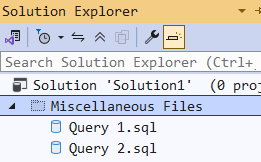
They are in the Miscellaneous Files section as they weren’t part of a script project.
SSMS can now compare multiple files. If I highlight both the files, and right-click, I get this option:
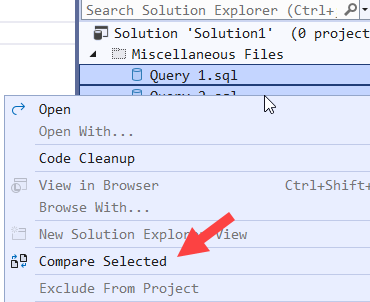
And when I select it, I now get a comparison of the two files:

SSMS Tips and Tricks Free eBook
Want to become a wizard on using SSMS? My free eBook covers so many tips and tricks, including this one. You’ll find it, and many other free resources from us, here: https://sqldownunder.com/freestuff/
2025-12-11