
Fabric: Determining whether connections are used in Microsoft Fabric

I work with a lot of connections in Microsoft Fabric and one of the operations that’s still surprisingly hard, is working out if you can delete a connection that you think is unused. Back in Azure Data Factory and tools like it, I can directly see how many places a given connection is configured. But Fabric doesn’t show that.
If I open the Connections and Gateways option from the settings, I see a list like this:
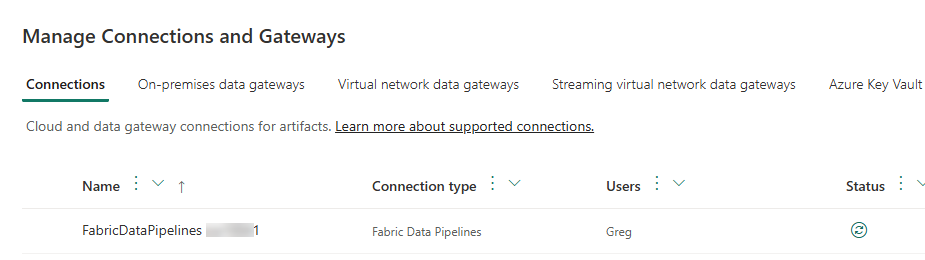
From there I can open the Settings for this connection, and at the bottom of the pane that appears, it shows this:
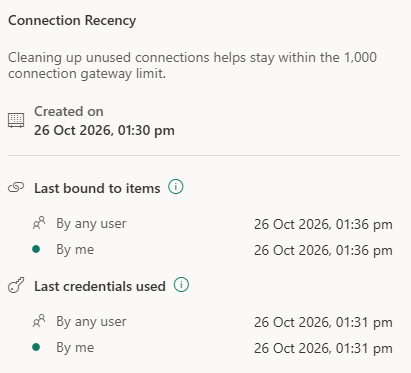
That shows me when the connection was last bound to an item, and also when the credential configured into it was last used, but it does not tell me if it’s still configured anywhere. But we can fairly easily do that with a notebook. I started by creating a new notebook called Find Connection Usage:
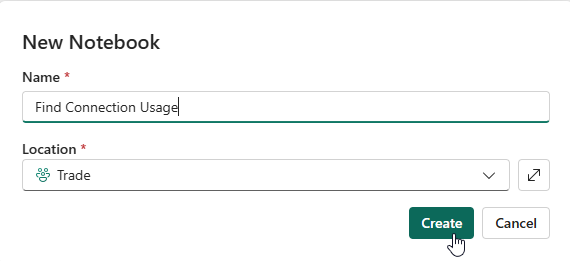
I then added the following code:
# Find where connections are used

import time
import requests
import pandas as pd
import notebookutils

# ============================================================
# Configuration
# ============================================================

WORKSPACE_NAME = "TXXX"    # Blank = all accessible workspaces
WORKSPACE_ID = ""           # Optional: ID overrides workspace name
TARGET_CONNECTION_ID = "PUT CONNECTION ID HERE"  # Blank = return all connections

BASE_URL = "https://api.fabric.microsoft.com/v1"

# ============================================================
# Authentication
# ============================================================

session = requests.Session()

def refresh_token():
    session.headers["Authorization"] = (
        f"Bearer {notebookutils.credentials.getToken('pbi')}"
    )

refresh_token()

# ============================================================
# Exceptions
# ============================================================

class UnsupportedItemError(Exception):
    pass


class FabricAPIError(Exception):
    pass


# ============================================================
# API helpers
# ============================================================

def api_get(url, params=None):
    """Call Fabric REST API with retries and error handling."""

    for attempt in range(7):

        # Allow for Fabric API throttling
        time.sleep(0.4)

        response = session.get(
            url,
            params=params,
            timeout=60
        )

        if response.status_code == 401 and attempt == 0:
            refresh_token()
            continue

        if response.status_code in (429, 500, 502, 503, 504):
            retry_after = response.headers.get("Retry-After")

            try:
                delay = float(retry_after)
            except (ValueError, TypeError):
                delay = min(2 ** attempt, 60)

            time.sleep(max(delay, 0))
            continue

        if response.ok:
            return response.json()

        # Extract the detailed Fabric error
        try:
            error = response.json()
        except ValueError:
            error = {}

        error_code = error.get("errorCode", "")
        message = error.get("message", response.text)

        # Handle unsupported item operations
        if response.status_code == 400 and (
            error_code == "OperationNotSupportedForItem"
            or "operation not supported for requested item"
               in message.lower()
        ):
            raise UnsupportedItemError(message)

        raise FabricAPIError(
            f"HTTP {response.status_code} | "
            f"{error_code} | {message}"
        )

    raise FabricAPIError(
        f"API request failed after retries: {url}"
    )


def get_all_pages(url):
    """Retrieve all pages using Fabric continuation information."""

    values = []
    params = None

    while True:
        data = api_get(url, params)
        values.extend(data.get("value", []))

        continuation_uri = data.get("continuationUri")
        continuation_token = data.get("continuationToken")

        if continuation_uri:
            url = continuation_uri
            params = None

        elif continuation_token:
            params = {"continuationToken": continuation_token}

        else:
            break

    return values


# ============================================================
# Find workspaces
# ============================================================

if WORKSPACE_ID.strip():

    workspaces = get_all_pages(f"{BASE_URL}/workspaces")

    workspaces = [
        w for w in workspaces
        if w["id"].lower() == WORKSPACE_ID.strip().lower()
    ]

elif WORKSPACE_NAME.strip():

    workspaces = get_all_pages(f"{BASE_URL}/workspaces")

    workspaces = [
        w for w in workspaces
        if w["displayName"].lower() == WORKSPACE_NAME.strip().lower()
    ]

else:

    workspaces = get_all_pages(f"{BASE_URL}/workspaces")


if not workspaces:
    raise ValueError(
        "No matching accessible workspaces were found."
    )


# ============================================================
# Examine workspace items
# ============================================================

results = []
skipped = []
errors = []

items_examined = 0
items_successful = 0

for workspace in workspaces:

    workspace_id = workspace["id"]
    workspace_name = workspace["displayName"]

    print(f"Examining workspace: {workspace_name}")

    try:
        items = get_all_pages(
            f"{BASE_URL}/workspaces/{workspace_id}/items"
        )

    except Exception as e:

        errors.append({
            "Workspace": workspace_name,
            "Item": "",
            "Item Type": "",
            "Error": str(e)
        })

        continue

    for item in items:

        items_examined += 1

        item_name = item["displayName"]
        item_type = item["type"]
        item_id = item["id"]

        try:

            connections = get_all_pages(
                f"{BASE_URL}/workspaces/{workspace_id}"
                f"/items/{item_id}/connections"
            )

            items_successful += 1

            for connection in connections:

                connection_id = connection.get("id") or ""

                if (
                    TARGET_CONNECTION_ID
                    and connection_id.lower()
                        != TARGET_CONNECTION_ID.strip().lower()
                ):
                    continue

                details = connection.get("connectionDetails") or {}

                results.append({
                    "Workspace": workspace_name,
                    "Workspace ID": workspace_id,
                    "Item": item_name,
                    "Item Type": item_type,
                    "Item ID": item_id,
                    "Connection": connection.get("displayName", ""),
                    "Connection ID": connection_id,
                    "Connectivity Type": connection.get(
                        "connectivityType", ""
                    ),
                    "Source Type": details.get("type", ""),
                    "Source Path": details.get("path", "")
                })

        except UnsupportedItemError as e:

            skipped.append({
                "Workspace": workspace_name,
                "Item": item_name,
                "Item Type": item_type,
                "Reason": str(e)
            })

        except Exception as e:

            errors.append({
                "Workspace": workspace_name,
                "Item": item_name,
                "Item Type": item_type,
                "Error": str(e)
            })


# ============================================================
# Build result DataFrames
# ============================================================

df = pd.DataFrame(results)
df_skipped = pd.DataFrame(skipped)
df_errors = pd.DataFrame(errors)


# ============================================================
# Display summary
# ============================================================

print()
print("Connection Audit Summary")
print("=" * 45)

print(f"Workspaces found:       {len(workspaces)}")
print(f"Items examined:         {items_examined}")
print(f"Items checked:          {items_successful}")
print(f"Unsupported items:      {len(df_skipped)}")
print(f"Errors:                 {len(df_errors)}")
print(f"Matching connections:   {len(df)}")


# ============================================================
# Display connection usage
# ============================================================

print("\nConnections found")
print("-" * 45)

if not df.empty:
    display(df.sort_values(["Workspace", "Item", "Connection"]))
else:
    print("No matching connections discovered.")


# ============================================================
# Display unsupported items
# ============================================================

print("\nUnsupported items")
print("-" * 45)

if not df_skipped.empty:
    display(df_skipped)
else:
    print("None")


# ============================================================
# Display unexpected errors
# ============================================================

print("\nErrors")
print("-" * 45)

if not df_errors.empty:
    display(df_errors)
else:
    print("None")
That will let us find where connections are used. It’s important to consider that this can be slow as many API calls might need to be made on a busy system. You can choose whether to run it for one or all connections, by adding the ID of the connection that you can find in the Settings for the connection. And you can choose whether to run it for one or all workspaces. For the workspace, you can provide either the name or the ID or leave them blank.
Here’s an example of the output for a connection that is in use:
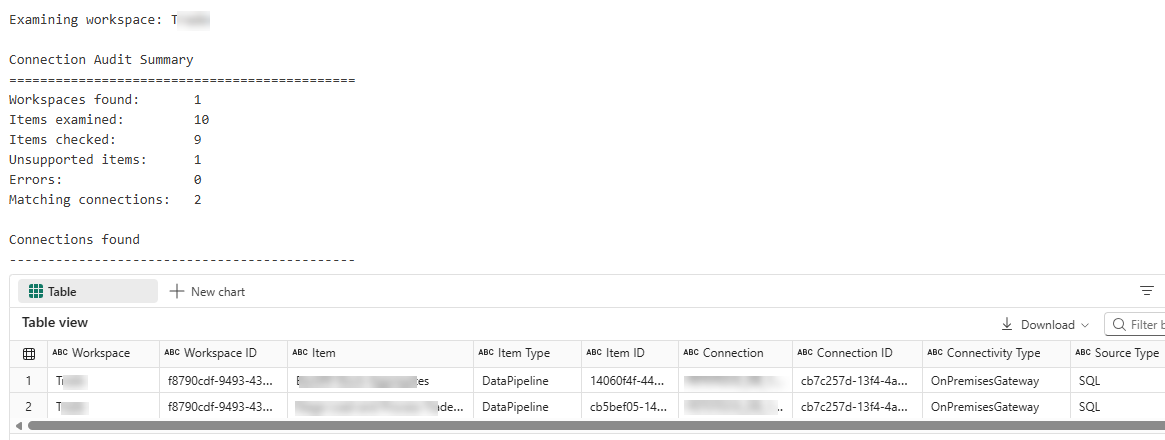
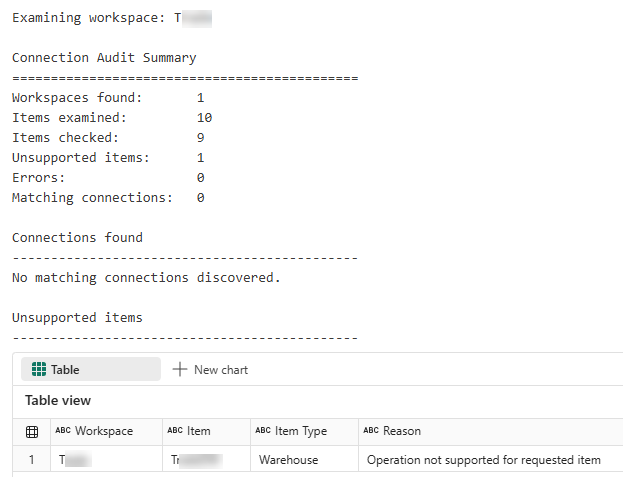
And note that not all item types support enumerating the associated connections. For example, I had a Fabric Data Warehouse in this workspace:
I’m sure this is not 100% perfect but it should be pretty close, and let you delete connections that you think aren’t used, with a lot more confidence.
I do hope the Fabric team will add an option to do this. I see that there is a community feedback item for it.
(And thanks to Fabio Bracht for the awesome Unsplash image)
2026-11-29