
Fabric RTI 101: What are Activator Rules?

In Activator, rules are the core element that make automation possible. A rule defines the condition you want the system to look for in your data — the point at which something should happen.
Rules can be simple or complex.
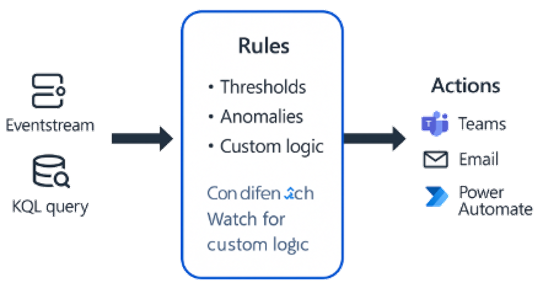
A simple example might be: temperature > 90°C or error rate exceeds 5%. These are fixed thresholds — clear, measurable values that indicate when a limit has been crossed.
But rules can also be more advanced, such as detecting an anomaly in a time series, identifying patterns across multiple signals, or combining several conditions together. For example, you might define a rule that triggers only when CPU usage is high and network latency increases at the same time.
The key advantage is that these rules are configured without writing code. You can define them visually in the Activator interface, using the available signals and comparison logic, or link them to results from KQL queries that already perform the analytical work.
Rules can be applied directly to incoming event streams, where data is evaluated continuously as it arrives, or to KQL query results, where you might check for trends or statistical changes.
When a rule condition is met, Activator creates a trigger, which then launches one or more actions — for example, sending a Teams notification or starting a workflow in Power Automate.
Rules are the foundation of Activator’s automation model. They bridge the gap between monitoring and action — turning real-time insights into operational responses.
Learn more about Fabric RTI
If you really want to learn about RTI right now, we have an online on-demand course that you can enrol in, right now. You’ll find it at Mastering Microsoft Fabric Real-Time Intelligence
2026-07-22