
Fabric RTI 101: Azure and Fabric Events
We’ve looked at events generated by applications, databases, and storage systems — but it’s important to remember that Azure and Fabric themselves also generate events. These are sometimes called platform events, because they come from the infrastructure and services you’re running rather than from your business data directly.
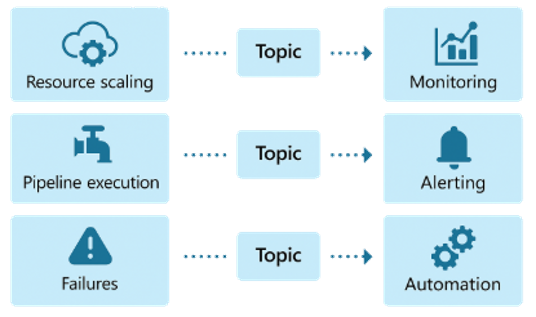
Some examples are really practical. Azure might emit events when resources are scaled up or down — say, when a cluster automatically adds nodes to handle increased load. Fabric might generate events when a pipeline starts, completes, or fails. You’ll also see events related to service health, configuration changes, or security alerts.
Why do these matter?
Because they let you build real-time monitoring and automation into your operations. If a pipeline fails, you can trigger an alert immediately — for example, sending a message into a Teams channel or creating a support ticket. If a scaling event occurs, you could automatically adjust downstream systems to match capacity. If a service reports an error condition, you can kick off a remediation workflow before it impacts end users.
These system-level events provide what we might call operational intelligence. While CDC, CES, and storage events tell you about changes in your data, platform events tell you about the environment running that data. Together, they give you a complete picture — what’s happening to the information itself, and what’s happening to the systems that manage it.
Don’t overlook platform events. They’re not just technical noise — they’re a powerful signal that you can use to keep your pipelines healthy, automate responses, and run your data platform more efficiently.
Learn more about Fabric RTI
If you really want to learn about RTI right now, we have an online on-demand course that you can enrol in, right now. You’ll find it at Mastering Microsoft Fabric Real-Time Intelligence
2026-02-24