
Mixing UNION and UNION ALL Operations
Recently, I saw a subtle coding issue related to the UNION operator. With SQL Server, the UNION operator combines two rowsets into a single rowset. If UNION ALL is used then all rows are returned. With just UNION without the ALL, only distinct rows are returned. All good so far.
One of the most common performance issues that I come across is where people have just used UNION where they should have used UNION ALL. That extra distinct operation is often not needed, yet often very expensive.
A mixture
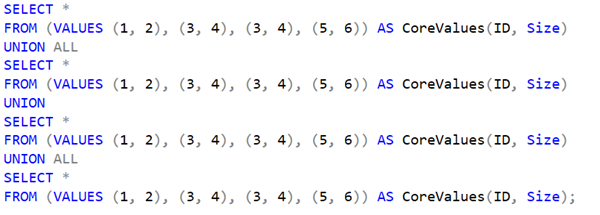
Until the other day though, I’d never stopped to think about what happens when you mix the two operations. I certainly wouldn’t write code like that myself but for example, without running the code (or reading further ahead yet), what would you expect the output of the following command to be? (Note: The real code read rows from a table but I’ve mocked it up with a VALUES clause to make it easier to see the outcome).
SELECT *
FROM (VALUES (1, 2), (3, 4), (3, 4), (5, 6)) AS CoreValues(ID, Size)
UNION ALL
SELECT *
FROM (VALUES (1, 2), (3, 4), (3, 4), (5, 6)) AS CoreValues(ID, Size)
UNION
SELECT *
FROM (VALUES (1, 2), (3, 4), (3, 4), (5, 6)) AS CoreValues(ID, Size)
UNION ALL
SELECT *
FROM (VALUES (1, 2), (3, 4), (3, 4), (5, 6)) AS CoreValues(ID, Size);
Would duplicate rows be returned?
When I first saw this, I was left wondering if there was some type of operation precedence between UNION and UNION ALL. The output rows are:
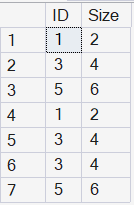
It isn’t a case of precedence. The operations are just being applied in order. You can see this as follows:
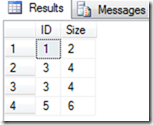
Executing the first part:
SELECT *
FROM (VALUES (1, 2), (3, 4), (3, 4), (5, 6)) AS CoreValues(ID, Size);
returns the following with no surprises:
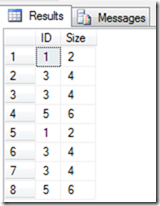
Executing the first two parts:
SELECT *
FROM (VALUES (1, 2), (3, 4), (3, 4), (5, 6)) AS CoreValues(ID, Size)
UNION ALL
SELECT *
FROM (VALUES (1, 2), (3, 4), (3, 4), (5, 6)) AS CoreValues(ID, Size);
returns all rows from both queries:
Executing the first three parts:
SELECT *
FROM (VALUES (1, 2), (3, 4), (3, 4), (5, 6)) AS CoreValues(ID, Size)
UNION ALL
SELECT *
FROM (VALUES (1, 2), (3, 4), (3, 4), (5, 6)) AS CoreValues(ID, Size)
UNION
SELECT *
FROM (VALUES (1, 2), (3, 4), (3, 4), (5, 6)) AS CoreValues(ID, Size);
returns the following rows. This is formed by taking the previous result, executing the third query then performing a distinct operation on the whole combined rowset.
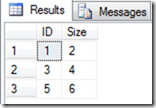
Executing the entire query then takes this previous result set and appends (based on the UNION ALL), the results from the fourth part of the query.
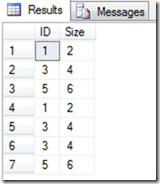
Regardless of how it actually works, I think it’s important to avoid writing code where the outcome is less than obvious. In the original code, mixing the two types of operations was just an unintentional bug but if the code as written had been the intended code, adding some parentheses to this query might have made the intent clearer.
The real code was worse
And of course in this case, the real code was much worse. They decided to fix the duplicate situation by adding extra DISTINCT and GROUP BY operations, which really made it a thing of beauty:
SELECT DISTINCT ID, Size
FROM
(
    SELECT *
    FROM (VALUES (1, 2), (3, 4), (3, 4), (5, 6)) AS CoreValues(ID, Size)
    UNION ALL
    SELECT *
    FROM (VALUES (1, 2), (3, 4), (3, 4), (5, 6)) AS CoreValues(ID, Size)
    UNION
    SELECT *
    FROM (VALUES (1, 2), (3, 4), (3, 4), (5, 6)) AS CoreValues(ID, Size)
    UNION ALL
    SELECT *
    FROM (VALUES (1, 2), (3, 4), (3, 4), (5, 6)) AS CoreValues(ID, Size)
) AS t
GROUP BY ID, Size;
which actually returned:
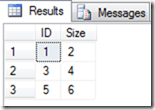
So what they really should have written in the first place was:
SELECT *
FROM (VALUES (1, 2), (3, 4), (3, 4), (5, 6)) AS CoreValues(ID, Size)
UNION
SELECT *
FROM (VALUES (1, 2), (3, 4), (3, 4), (5, 6)) AS CoreValues(ID, Size)
UNION
SELECT *
FROM (VALUES (1, 2), (3, 4), (3, 4), (5, 6)) AS CoreValues(ID, Size)
UNION
SELECT *
FROM (VALUES (1, 2), (3, 4), (3, 4), (5, 6)) AS CoreValues(ID, Size);
(sigh)
Learn more about Advanced T-SQL
If you really want to learn about SQL Server Advanced T-SQL, we have an online on-demand course that you can enrol in, right now. You’ll find it at SQL Server Advanced T-SQL for Developers and DBAs
2026-02-27