
SSMS Tips and Tricks 1-13: Database scoped configurations UI

The SQL Server team has been working towards making databases more standalone, and less dependent on the server, for quite a while. SQL Server 2012 was the first version that had a concept of a contained database. The thinking was that you should be able to move databases around to different servers and, in that case, users would follow with the database because they didn’t have a dependency on logins, which was the case up until then.
But users were only an early part of this story. Whether you want users contained or not, there are so many configurations at the server level that people wanted to be able to configure at each database, instead of only at the server. So, we saw the introduction of Database Scoped Configurations.
What was missing from this was a UI for setting them. SSMS now has a UI for configurations at the database level in the database properties from Object Explorer:
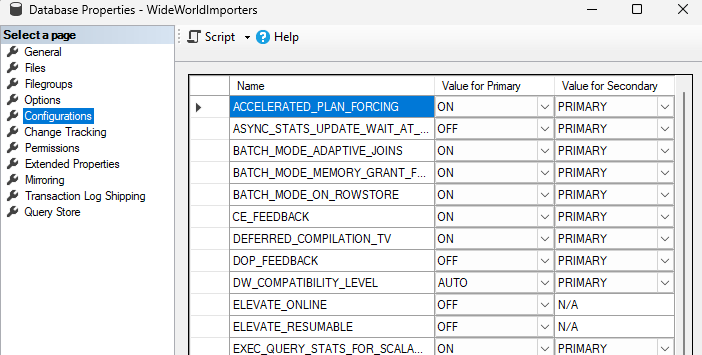
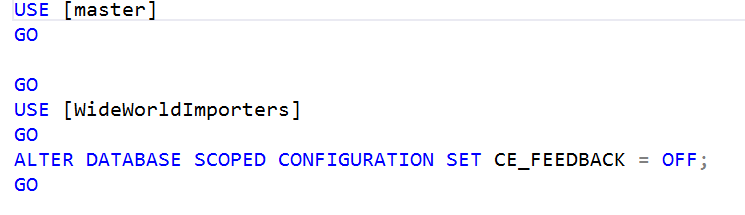
And because databases can be part of availability groups, there are options for setting values on the primary replica, and on secondaries. All are scriptable as well. For example, if I change the CE_FEEDBACK option on the primary to OFF, and instead of clicking OK to save it, I use the Script option at the top, to script to a new query window, I’ll see the following. Can’t say I love the generated script, but it would work.
SSMS Tips and Tricks Free eBook
Want to become a wizard on using SSMS? My free eBook covers so many tips and tricks, including this one. You’ll find it, and many other free resources from us, here: https://sqldownunder.com/freestuff/
2025-11-11