Sql-Server

SDU Tools: List use of Deprecated Data Types in a SQL Server Database

SDU Tools: List use of Deprecated Data Types in a SQL Server Database

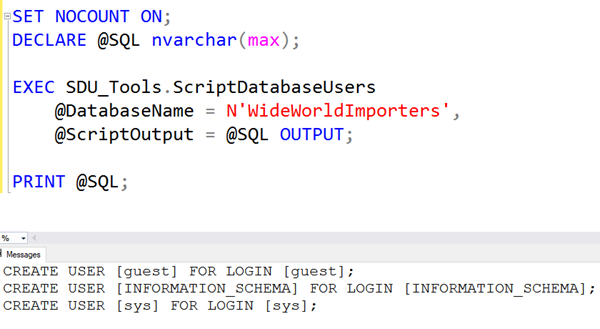
I’m often reviewing existing databases and one of the first things I go looking for is the way they’ve used data types. In particular, I’m keen to know if they’ve used any deprecated data types (ie: ones that will/might be removed at some point).  In our free SDU Tools for developers and DBAs,  we added a procedure ListUseOfDeprecatedDataTypes to do just that, and to provide their details in a form that’s easy to consume programmatically if you need that.

2018-12-05

Opinion: Case sensitivity is a pox on computing

Opinion: Case sensitivity is a pox on computing

I’ve been in the IT industry a long, long time. One thing that I’ve never liked is case sensitivity in application development tools or in database languages.  And it’s creeping into more and more places.

I know that will offend some people but hear me out.

I think we’re stuck with case sensitivity in languages like C, C#, C++, Java, etc. because that was the easiest way to implement those languages in the first place. As soon as you decide that a language is case insensitive, you also have to decide the internal collation rules. For example, is the letter A the same as the letter a ? But then what about the letter á ?

2018-12-04

SQL: Should foreign keys be indexed in SQL Server?

SQL: Should foreign keys be indexed in SQL Server?

If I create a primary key (let’s say a CustomerID in a Customers table) in SQL Server, an index is automatically created to support that key. Primary keys must be unique and not null. SQL Server uses that index to ensure that the key is unique. Keep in mind that when I say “key”, I’m referring to one or more columns, not necessarily just one.

The same happens for unique keys. Again, it makes it easy for SQL Server to ensure the uniqueness.

2018-12-03

Shortcut: Query and results in separate tab in SQL Server Management Studio

Shortcut: Query and results in separate tab in SQL Server Management Studio

Another simple tip for today. In SQL Server Management Studio (SSMS), query results are normally shown at the bottom of the query window.

This can greatly reduce the screen real estate both for the query, and for viewing the results.

In Tools, Options, Query Results, SQL Server, Results to Grid, there is an option to Display results in a separate tab. This can be very useful and generally you will also want to choose the extra option to Switch to results tab after the query executes.

2018-11-29

SDU Tools: Number to Roman Numerals in SQL Server

SDU Tools: Number to Roman Numerals in SQL Server

Ever since we’ve been shipping our free SDU Tools for developers and DBAs, we’ve been getting interesting requests from users for additions to the tools. Today’s tool is one of the stranger requests but for the odd situation where you need it, I’m sure we will have saved you a lot of work. That tool is NumberToRomanNumerals.

The person who requested it was outputting values that need to go into media trailers, pretty much as you see Roman numerals in the tail end of many movies.

2018-11-28

SQL: Developers need to stop rewriting history

SQL: Developers need to stop rewriting history

I often deal with quite large databases. There are only two things about big databases that trouble me. One is queries that need to read the whole database to find anything. The other is big databases that are still designed like small databases.

Every week, I still see massive SQL Server databases where all of the data is in a single PRIMARY filegroup. That’s a problem but often the people looking after the databases can’t do much to improve that situation.

2018-11-26

Shortcut: Viewing and configuring spatial data output in SSMS

Shortcut: Viewing and configuring spatial data output in SSMS

SQL Server 2008 added the ability to work with spatial data by the additional of the geometry and geography data types. When they first were added, there was no tools support for working with them, and all we had was direct manipulation of their internal binary storage.

Here’s an example:

I’ve defined a variable named @Shape of type GEOMETRY. I’ve then assigned a shape to it, based on a polygon formed by a set of points. If you look carefully, you’ll notice that it’s a square.

2018-11-22

SDU Tools: List Primary Key Columns in a SQL Server Database

SDU Tools: List Primary Key Columns in a SQL Server Database

I’m often checking out what the primary keys are for tables that I’m working on. One of our free SDU Tools for developers and DBAs does just that. it’s ListPrimaryKeyColumns.

You can see how to execute it in the main image above. The procedure takes these parameters:

@DatabaseName sysname - This is the database to process @SchemasToList nvarchar(max) - a comma-delimited list of schemas to include (ie: ‘Sales,Purchasing’) or the word ‘ALL’ @TablesToList nvarchar(max)- a comma-delimited list of tables to include (ie: ‘Customers,Orders’) or the word ‘ALL’

2018-11-21

SQL: Is there a need to check RI in data warehouses?

SQL: Is there a need to check RI in data warehouses?

Betteridge’s law of headlines says that any headline that asks a question can be answered “no”. Well, contrary to that law, the TLDR answer to this is “yes”. I’m endlessly reading information that says that if your referential integrity is being checked in your OLTP application that’s providing data for your data warehouse, that you don’t need to then check it within the data warehouse. Sadly, this is often naïve thinking, for a number of reasons.

2018-11-19

Shortcut: Set SQLCMD mode for all new query windows in SSMS

Shortcut: Set SQLCMD mode for all new query windows in SSMS

SQLCMD mode changes how queries are executed in SQL Server Management Studio (SSMS). When using this mode, you can work with options that aren’t normally part of SQL Server T-SQL scripts.

Some installation scripts also require SQLCMD mode and will fail if it’s not enabled.

Here’s an example of running a query against 3 servers within the same script:

First we open a new query window, then on the Query menu, we choose SQLCMD Mode.

2018-11-15