Sql-Server

T-SQL 101: 66 Date and time data types in SQL Server T-SQL

T-SQL 101: 66 Date and time data types in SQL Server T-SQL

While there are some other data types that I’d like to see added (for example a month data type), SQL Server has quite a rich set of date and time data types. Some of these were older data types and some new ones were introduced in SQL Server 2008.

An important one that was added in 2008 is the date data type. It’s just a date. It has no time associated with it and it covers year from 1 to 9999. It says that it’s based on the Gregorian calendar (i.e. our current calendar) but that’s a bit ambitious given it didn’t exist back in the year 1. But for the range of dates that we would work with, this will always work fine.

2020-04-20

SQL: Why I prefer sequences to IDENTITY columns

SQL: Why I prefer sequences to IDENTITY columns

I posted the other day that I don’t like negative ranges used for IDENTITY columns. I feel the same about the range of values for sequences, but when I mentioned that I prefer using sequences, a few friends asked why I preferred them.

Let me start by saying that I was surprised with the previous post, that the strong responses were about using natural vs surrogate keys. That had nothing to do with what I was discussing, and is an endless topic for another day. The issue was about when someone has already decided to use an IDENTITY or a sequence. And so, the same point applies to this discussion.

2020-04-17

SQL: Don't start identity columns or sequences with large negative values

SQL: Don't start identity columns or sequences with large negative values

This week, one of my colleagues was complaining that he had to do work on a database where every table had identity columns, and they all started at large negative values.

I remember some people promoting this years ago, to double the available numeric range for the data types, rather than just using positive values.

I didn’t like it when I saw it then, and I still don’t like it.

2020-04-16

SDU Tools: Start of week and End of week in SQL Server T-SQL

SDU Tools: Start of week and End of week in SQL Server T-SQL

I get really good feedback all the time from users of our free SDU Tools for developers and DBAs, but none more than when we have more and more date and time functions. One pair of functions that we added in v19 that was recently shipped was StartOfWeek and EndOfWeek.

These are simple scalar functions that take a single date parameter, and return the date for the start and end of the week that contains the date provided.

2020-04-15

T-SQL 101: 65 Formatting strings in SQL Server T-SQL using FORMAT

T-SQL 101: 65 Formatting strings in SQL Server T-SQL using FORMAT

In upcoming blog posts, I’ll show you how to change from one data type to another. I’ll show you how to use CONVERT to output date/time values to string formats.

If you look at the web page for CAST and CONVERT, you’ll notice there are many styles for conversion. For example, the US format is called 101 if it has a 4 digit century. But it’s called 1 if you only have a 2 digit century. Another very common one is the British/French one and that’s 103 for a 4 digit century or just 3 for a 2 digit century.

2020-04-13

Version 19 of our free DBA and Developer tools has now shipped

Version 19 of our free DBA and Developer tools has now shipped

I just wanted to give everyone a heads-up that we recently shipped version 19 of our free SDU Tools for developers and DBAs to our SDU Insiders.

We’re pretty happy with this new version and it includes Azure SQL Database support as well as SQL Server.

So what’s changed?

Version 19 includes the following enhancements:

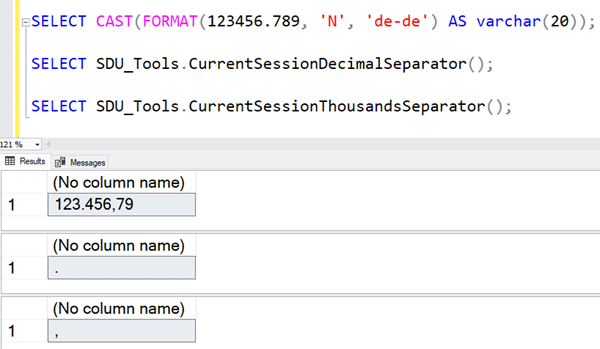
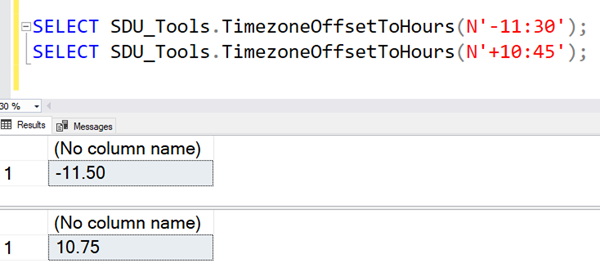
DatesBetweenNoWeekends - A new version of our DatesBetween function that excludes weekends InitialsFromName - Extracts someone’s initials from their name (with/without a separator) DateDimensionPeriodColumns - We’re really proud of this one. It completely enriches your date dimensions with period logic. I’d encourage you to watch the video for this one. StartOfYearEndOfYearStartOfWeekEndOfWeekStartOfWorkingWeekEndOfWorkingWeek - more date calculations that do what their names suggest CurrentSessionDecimalSeparator - works out what the decimal separator is in your session CurrentSessionThousandsSeparator - does the name for the thousands separator StripDiacritics - Strips diacritics (accents, graves, unlauts, etc.) from a string DateTime2ToUnixTimeUnixTimeToDateTime2 - New functions for conversion to/from Unix times TimezoneOffsetToHours - Converts a timezone offset to a decimal number of hours

2020-04-12

New free eBook for SDU Insiders - Implementing Transparent Database Encryption (TDE) in SQL Server

New free eBook for SDU Insiders - Implementing Transparent Database Encryption (TDE) in SQL Server

Hi Folks,

We’ve just produce another new eBook that’s with our compliments, for anyone subscribed to our SDU Insiders list.

If you’ve wondered about implementing TDE and aren’t sure, this guide should help. If you’ve already implemented it and aren’t sure if you’ve done things right, again this should help.

The book also includes a frequently-asked questions section with questions we’ve commonly been asked by our clients.

You’ll find it here: http://tdebook.sqldownunder.com

2020-04-10

SQL: When working with ALTER DATABASE, don't forget CURRENT

SQL: When working with ALTER DATABASE, don't forget CURRENT

I’ve been seeing quite a lot of unnecessary dynamic SQL code lately, that’s related to ALTER DATABASE statements.  It was part of code that was being scripted.

Generally, the code looks something like this:

DECLARE @SQL nvarchar(max);

SET @SQL = N'ALTER DATABASE ' 
           + DB_NAME() 
           + ' SET COMPATIBILITY_LEVEL = 150;';

EXEC (@SQL);

(I’ve used setting a db_compat level as an example)

Or if it’s slightly more reliable code, it says this:

2020-04-09

T-SQL 101: 64 Changing the offset of a datetimeoffset value in SQL Server T-SQL using SWITCHOFFSET

T-SQL 101: 64 Changing the offset of a datetimeoffset value in SQL Server T-SQL using SWITCHOFFSET

The datetimeoffset data type was added in SQL Server 2012 and allowed us to not only store date and time values, but to also store a time zone offset (from -14 hours to +14 hours). When you’re using this data type though, you might need to change a value from one time zone offset to another.  That’s the purpose of the SWITCHOFFSET function.

Look at the following query:

SYSDATETIMEOFFSET is being used to return the current date, time, and time zone offset for the server, but we’re also asking for the equivalent with a +7 time zone offset. (That was the current time in Seattle when the query was run). You can see the result here:

2020-04-06

SQL Down Under Podcast 79 with Guest Mark Brown

SQL Down Under Podcast 79 with Guest Mark Brown

Hi Folks,

Just a heads-up that we’ve just released SQL Down Under podcast show 79 with Microsoft Principal Program Manager Mark Brown.

Mark is an old friend and has been around Microsoft a long time. He is a Principal Program Manager on the Cosmos DB team. Mark is feature PM for the replication and consistency features. That includes  its multi-master capabilities, and its management capabilities. He leads a team focused on customers and community relations.

2020-04-04