Microsoft-Fabric

Fabric RTI 101: What is Processing?

Fabric RTI 101: What is Processing?

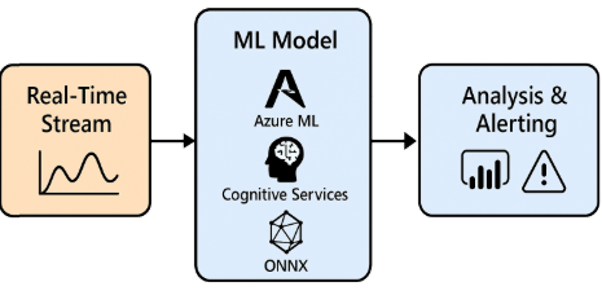
Once events have been ingested, the next step is processing. This is where we take the raw firehose of events and turn it into something meaningful and usable.

NOTE: We’re not talking about storing the events in a database, and then querying them. We can do that, but here we’re talking about transforming the events in-flight. It’s similar to what we could do with Azure Stream Analytics. I like the description that says that instead of throwing a query at the data, you’re throwing the data at a query.

2026-01-25

Fabric RTI 101: What is Ingestion?

Fabric RTI 101: What is Ingestion?

Ingestion is the very first step in any real-time architecture: getting events from wherever they originate and bringing them into where they can be processed, analyzed, and acted on.

Events typically start their lives in all kinds of different systems. They might come from Kafka topics in an enterprise environment, AMQP brokers in messaging-based systems, or from Azure-native services like Event Hubs or IoT Hub, which are especially common in cloud and IoT scenarios. Ingestion is what connects those sources into Fabric. Without it, you don’t have anything to work with.

2026-01-23

Fabric RTI 101: What are Streams?

Fabric RTI 101: What are Streams?

Once we understand what an event is, the next concept is the stream. A stream is simply a continuous flow of events over time. Instead of looking at events one by one in isolation, a stream is what you get when you treat them as a live feed coming from a source.

For example, imagine an IoT scenario. Each sensor reading from a device is an event. But when you look at all those readings flowing in second by second, that becomes a stream of telemetry. In a financial system, every transaction is an event — but all transactions flowing in from your payment gateway form a transaction stream.

2026-01-21

Fabric RTI 101: What are Events?

Fabric RTI 101: What are Events?

In real-time intelligence, everything starts with the concept of an event. An event is the most fundamental unit of real-time data — it’s simply a record that something happened.

That something could be almost anything, depending on your business. In finance, an event might be a stock trade or a payment transaction. In a web application, it might be a customer clicking a button, logging in, or abandoning a shopping cart. In IoT, it could be a sensor reading like temperature, vibration, or GPS coordinates. Even a server log entry or an error message can be considered an event.

2026-01-19

Fabric RTI 101: What does Microsoft Fabric Real-Time Intelligence Provide?

Fabric RTI 101: What does Microsoft Fabric Real-Time Intelligence Provide?

Microsoft Fabric Real-Time Intelligence is a complete toolkit — an end-to-end set of capabilities that allow you to take streaming data, make sense of it, and act on it.

It starts with event ingestion. Fabric can connect to a wide range of streaming sources: Kafka, Azure Event Hubs, IoT Hub, and many others. That means whether your data is coming from IoT sensors, application logs, or business systems, you can bring it all into Fabric without a lot of custom wiring. Fabric RTI doesn’t force you to pick one source — it’s designed to be open and flexible.

2026-01-17

Fabric RTI 101: Batch Processing vs Streaming

Fabric RTI 101: Batch Processing vs Streaming

Batch processing has been the backbone of data analytics for decades. The idea is simple: you collect data over a period of time, maybe hours or a whole day, and then process it in one big chunk. This is how traditional ETL pipelines and overnight data warehouse loads work. It’s efficient when immediacy doesn’t matter — for example, producing a daily sales report each morning.

But the limitation is obvious: if you need to react quickly, batch just doesn’t cut it. By definition, you’re waiting for the batch window to complete before you see the results. If fraud is happening right now, or if a customer is struggling with your app this very minute, a batch report tomorrow morning is far too late.

2026-01-15

Fabric RTI 101: Latency vs Freshness Tradeoffs

Fabric RTI 101: Latency vs Freshness Tradeoffs

When people hear the phrase real-time, their minds often jump straight to sub-second response. They imagine dashboards updating instantly or transactions being analyzed faster than the blink of an eye. But in reality, not every scenario demands that level of speed — and chasing sub-second performance everywhere can actually be counterproductive.

Lateness vs Freshness

It’s helpful to think about real-time in classes of latency. At the extreme, you have sub-second responses — critical for areas like algorithmic trading, where even a few milliseconds can cost millions. Then there are scenarios where a response in a few seconds is perfectly adequate — for example, fraud detection. If you can flag a suspicious credit card transaction within two or three seconds, that’s usually enough to stop the transaction before it clears. And then there are other cases where even minutes are fine. Think about a customer experience dashboard in a call center — if the screen refreshes every minute or two, that still feels live enough to be useful.

2026-01-13

Fabric RTI 101: Why Real-Time Matters

Fabric RTI 101: Why Real-Time Matters

When we talk about real-time, it’s worth asking: why does it matter so much? The answer is that in many situations, timing is everything. Traditional business reports are incredibly valuable, but they often arrive hours or days after the fact.

By the time you’ve spotted the issue, the opportunity to act has already passed.

Lateness vs Freshness

Take fraud detection as an example. If a customer’s credit card is being misused, you can’t afford to wait until the next daily reconciliation. By then, dozens of fraudulent purchases might have gone through. Real-time intelligence means the system can detect unusual patterns on the spot and stop the fraud before it escalates.

2026-01-11

Fabric RTI 101: What is Real-Time Intelligence?

Fabric RTI 101: What is Real-Time Intelligence?

This is the start of a new series of blog posts dedicated to Microsoft Fabric Real-Time Intelligence or RTI. I think RTI is an important aspect of Microsoft Fabric, yet it is currently underutilized. I hope to try to help change that.

So why, RTI ?

Let’s start with a simple idea. Real time intelligence (or RTI) is about shrinking the delay between when data is created and when you can act on it. In traditional systems, we’re often used to data being collected, stored, and only analyzed later, maybe overnight or even weekly. That’s fine for long term reporting, but it’s too slow for situations where immediate action matters.

2026-01-09

Mastering Microsoft Fabric Real-Time Intelligence Course Released

Mastering Microsoft Fabric Real-Time Intelligence Course Released

More Microsoft Fabric love !

Turn data into insights the moment it happens because yesterday’s data is already too late !

We’ve added more Microsoft Fabric love to our courses. We’re pleased to announce that our new course Mastering Microsoft Fabric Real-Time Intelligence is now available. This is another course that we’ve had so many requests for. You can find details of it here:

Mastering Microsoft Fabric Real-Time Intelligence

Do you need to master Real-Time Intelligence in Microsoft Fabric?

2025-12-14