Fabric RTI 101: Querying using KQL
KQL, or Kusto Query Language, is the primary way we interact with data stored in a KQL database. It’s a read-only, declarative language — meaning you describe what result you want, rather than giving the system a sequence of procedural steps to perform. It’s designed specifically for interactive analytics on large, fast-moving datasets such as telemetry, logs, or IoT events, where you need quick insights rather than data updates.
One of the biggest differences you’ll notice compared with SQL is the pipeline syntax. Instead of writing long, nested queries with sub-selects or CTEs, KQL uses the pipe operator (|) to pass the output of one operation directly into the next. This creates a kind of query “flow” — very readable and very modular. For example, you might start with a table name, filter the rows, then summarize, and finally sort the results, each step connected by a pipe. It reads much more like a logical sequence of transformations than a single dense statement.
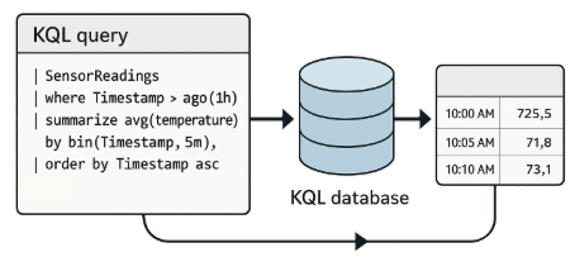
KQL is particularly strong when you’re working with time-series data. Time is usually the first dimension you filter on.
You can easily select events that occurred in the last hour or the last 24 hours using simple expressions like where Timestamp > ago(1h). Then you can bin the data into time intervals — say, five-minute or one-hour buckets — using the bin() function. This allows you to calculate aggregates over each window, such as counts, averages, or maximum values. It’s a natural fit for telemetry and monitoring workloads where you want to see how something changes over time.
The language also provides a wide set of operators for pattern detection and anomaly analysis. You can use functions like make-series, join, or extend to correlate data across streams, or apply statistical and machine-learning style operators to identify unusual values. This makes KQL well suited not only for dashboards, but also for alerting and diagnostic analysis — for example, spotting sudden spikes in error rates or detecting when a device stops sending signals.
Because KQL is read-only, it’s very safe to use even on production datasets — you can’t accidentally modify or delete data. The engine is optimized to scan large amounts of data quickly, so results typically come back in seconds even over billions of rows.
KQL gives you an efficient and expressive way to query, filter, and summarize streaming or historical telemetry data. Its pipeline syntax keeps complex analyses understandable, and its time-based functions make it an ideal language for exploring trends, detecting issues, and understanding what’s happening in your systems in real time.
Learn more about Fabric RTI
If you really want to learn about RTI right now, we have an online on-demand course that you can enrol in, right now. You’ll find it at Mastering Microsoft Fabric Real-Time Intelligence
2026-05-29