
Fabric RTI 101: Tumbling

Let’s take a look at the windowing options available. The first of these is the tumbling window, and it’s the simplest type of temporal window. It slices the event stream into fixed-length, adjacent blocks of time, with no overlap and no gaps. Think of it like dividing a timeline into perfectly equal buckets — each window starts as soon as the previous one ends.
For example, let’s say we’re monitoring sales transactions. If we set up a tumbling window of five minutes, then every five minutes the system calculates totals or averages. At the end of each window, you get a new result, and then the process resets for the next five-minute slice.
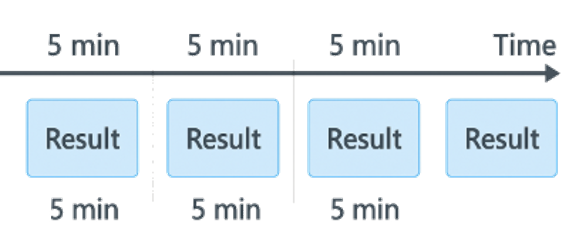
This approach is ideal when you need consistent, regular reporting intervals. Dashboards and monitoring systems often use tumbling windows because they make it easy to compare one period to the next — for example, sales in the last 5 minutes or number of logins in the last 10 minutes.
The trade-off is that because windows don’t overlap, you may miss changes happening between buckets. If a spike occurs at the boundary between two windows, each one will only show part of it. That’s where other window types like sliding or hopping come in, but for simple, predictable metrics, tumbling windows are often the best choice.
Learn more about Fabric RTI
If you really want to learn about RTI right now, we have an online on-demand course that you can enrol in, right now. You’ll find it at Mastering Microsoft Fabric Real-Time Intelligence
2026-04-13