
SQL: Linked Servers: Don't hard code server names

I’m not a great fan of linked servers in SQL Server but they are often necessary. If I’m working with the latest version of SQL Server, I really prefer to use External Data Sources and External Tables. But not everyone is on the latest version. In the meantime, what I see all the time, is people hardcoding server names like this:
SDUPROD2022.WWIDB.Payroll.Employees
That makes your code really hard to manage. One option to get around that is to use synonyms.
Instead of sprinkling references to that table all through the code, one option is that you can create a synonym for it like this:
CREATE SCHEMA Payroll AUTHORIZATION dbo;
GO

CREATE SYNONYM Payroll.Employees
FOR SDUPROD2022.WWIDB.Payroll.Employees;
GO
I created a local schema to match the way I think of the remote server i.e., in this case, I think of it as the Payroll or HR server. Then I created a synonym for the remote table. That way, all of my code can just reference Payroll.Employees, and it avoids the four-part name being littered all through my code.
One aspect of this that I don’t love is that if the server name or database name changes, I do need to recreate all the synonyms, and I might have a bunch of them. But that’s still far, far less work than finding all the places where four-part names have been used, and updating them.
Linked Server alias
You can also use an alias name when creating a linked server. Most people realize that you can do that for non-SQL Server linked servers, but don’t realize that the underlying stored procedure allows it for SQL Server linked servers too. I have no idea why the UI in SSMS doesn’t allow this. I’ll have to talk to my friends on the SSMS team about that.
Setting the alias
Notice that when you first go to create a linked server in SQL Server Management Studio, you can choose the name to be different to all the other properties (which include the server name):
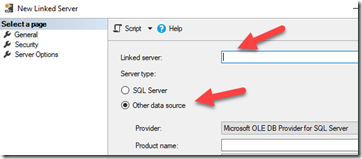
But as soon as you choose the server type as SQL Server, that option can’t be used as the single textbox is used for both the name of the actual server and the alias for the linked server.

The underlying stored procedure sp_addlinkedserver quite happily lets you assign a different name.
This is important because it means that I can create a linked server called HRServer for my actual server SDUPROD2022, and use that name when creating the synonyms instead:
CREATE SYNONYM Payroll.Employees
FOR HRServer.WWIDB.Payroll.Employees;
GO
Then if I need to move the database to another server, the only thing I need to change is the linked server definition, instead of all the synonyms that reference it.
That’s a great step forward but I still have to change them if the database name changes.
If you have the luxury of working with the latest version of SQL Server, you can instead create an External Data Source, and then create External Tables. One bonus is that they now seem to play nicely with Intellisense as well.
Yet another option - DNS
Yet another option is to create a DNS name for the target server, then make your linked server name refer to that DNS name. Then when the server changes, there is nothing to change at the SQL Server end, unless the database name also changed.
2026-03-09